Welcome to My Blogspot

Cell Phones & Plans Tech

Nokia 7610b

Posted By Denys Java Saturday, January 23, 2010 0 komentar


Nokia 7610b

Nokia, the largest cell phone manufacturer in the world, offers a wide array of phones from the most simple to power smartphones running Symbian Series 60. The 7610 is one of Nokia's high end beauties, running the new version 2 of Symbian Series 60 and offering just about every feature you could want. It's a GSM phone that comes in two flavors: the 7610 which runs on 900/1800/1900MHz bands (world phone) and the still hard to find 7610b which runs on the 850/1800/1900MHz bands for the US. The phone is widely available in Europe and Asia, and from importers in the US. As of late November 2004, Cingular will be offering the 7610b in the US: great news!

The 7610 caters not only to power users, but those who want a strong dose of style. Nokia makes many, many cookie-cutter candy bar phones; but they're also fond of playing with style, sometimes radically in certain models. Unlike the Nokia 3650 which had a round keypad design that was so radical it gave fervent SMS-ers apoplexy, the 7610's stylized keypad is striking but not impossible to use. The 7610 has a design that most folks find striking and very attractive and it turns heads wherever we go. It's available in black or white and as you'd expect, Nokia sells additional "Express On" covers should you feel like a color change. But the 7610 is more than just a pretty face, and features great reception, Bluetooth, a lovely 65,000 color 2" display and a stunning 1 megapixel camera capable of taking still shots and video.

Design and Ergonomics

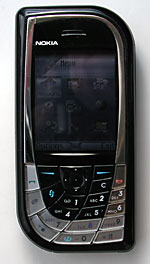
This is a device that hopes to find its way into the Museum of Modern Art. The black version is particularly striking and has a gloss finish with silver (some versions add red) accents. It is perfectly symmetrical with right angles at the top left and lower right corners, and gentle curves on the top right and lower left. Turn it on its face, turn it upside down and the pleasing form will remain the same.

The silver insets around the large display swoop down to meet the keypad where they widen, forming the backdrop for the outer keys. The keypad features a sweeping radial design and the left and lower keys are larger than the rest. Though the keys aren't uniformed in size and don't line up in the usual rectangular pattern with the 4 key directly below the 1 key, the keyboard isn't hard to use. In two hours I found it easy to use the keypad for dialing and SMS. Though the keyboard has a visually distinct appearance, Nokia didn't alter the keys enough to create usability problems.
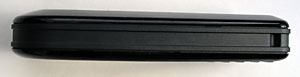

Above: side view of the Nokia 7610b. Below, a size comparison with the Motorola MPx220,
Sony Ericsson T610, the Nokia 7610 and the Nokia 3650.


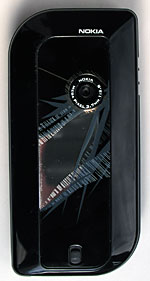
The center directional pad is small and stiff, nested perhaps a bit too close to the surrounding keys. It's usable and works well one-handed but you'll need a bit of coordination and a day of use to become proficient at it. A two inch display dominates the upper portion of the unit, with the speaker located above the display. The Nokia Pop-Port is located on the bottom of the phone and the camera lens on the back. The lens is relatively large compared to some other camera phones and that's a good thing: a larger lens usually means better photos. Rather than the usual tiny round self-portait mirror found next to the lens, the 7610 has a large mirror that incorporates nicely into the design on the back panel. Those of us who like to check our hair on the go will love that mirror, while those who score low on the vanity scale might prefer a completely black rear casing. Regardless of which camp you fall into, you'll likely agree that the mirror and and surrounding pattern are striking. And after all, this phone is both a smartphone and a fashion phone. If you like the features and specs of the 7610 but don't want the novel keyboard or standout looks, consider the Nokia 6670 instead. The 6670 is a triband world phone with the guts of a 7610 and a more "normal" appearance.

Horsepower and Expansion

According to Psiloc System Tools, the 7610 has a 123MHz ARM processor which is currently one of the fastest you'll find in a Series 60 phone. It has 8 megs of internal memory, which doesn't sound like much, but it's more than adequate because Symbian apps are generally quite small. The phone uses the new Reduced Size MMC cards (RS-MMC) which are half the length of standard MMC cards. But you won't have to scramble to find a card for your 7610 because Nokia generously includes a 64 meg card with the phone. You'll find a variety of 3rd party software demo apps on the card which you can test, purchase or delete as you see fit. Nokia says that the phone will work with up to 256meg RS-MMC cards and that was the largest capacity available when the phone was released. Now there are 512 meg cards on the market and they work fine with the 7610.

The phone has Bluetooth, a Nokia Pop-Port connector but no IR. It comes with the DKU-2 USB cable which attaches to the Pop-Port for syncing and using the phone as a wireless modem for a PC or Mac over USB. As Windows user who's struggled to sync PIM data over Bluetooth using PC Suite can tell you, the cable is a much more reliable and less crazy-making method of getting you Contacts, Calendar, Tasks and Notes data synced to the phone. You can still transfer files to and from the phone via Bluetooth, but the 7610 doesn't support Serial Port Profile, so you will need to use the cable to sync PIM data.

A Bit about Bands and the 7610 vs. 7610b

As mentioned, the phone comes in two versions, the 7610 and the 7610b. The 7610 is a world phone that works anywhere GSM service is available. It has 900MHz (Europe), 1800MHz (Asia) and 1900MHz (US). The 7610b targets the US, and trades the 900MHz band for 850MHz which is a relatively new band used in the US by AT&T/Cingular. You'll still get reception in the US using the non-b version of the phone on the 1900MHz band. 1900MHz is used by every US GSM carrier, but some metro areas have been built out with added 850MHz service in the past year. Note that if you get the b version, you won't be able to use the phone in Europe. If you're a T-Mobile US customer, you don't need to worry about the 850MHz band because T-Mobile only uses 1900MHz.

Phone Features, Reception and Data

Nokia phones have great reception and the 7610b is no exception. In fact, it tops other recent Nokias we've tested including the 3650, N-Gage QD and the 6820. The phone gets a signal where other phones can't and shows very high db readings overall for signal strength. The unit hasn't dropped a call in two weeks of testing, even when in a very poor signal area with 1 bar. Miraculously, call sound quality was good even with 1 bar. We tested the unit with a T-Mobile SIM on the 1900MHz band in the US. No doubt, US customers with AT&T/Cingular on 850MHz towers will see even better performance indoors as will 900MHz users in Europe.

The 7610 has all the standard phone features you'll find on other Series 60 phones such as voice dialing using voice tags, a loud speaker phone, speed dialing for up to 99 numbers, support for conference calling, call waiting and picture caller ID. The phone's earpiece and mic volume are good and are loud and clear enough for use in public places. The 7610 ups the ante with voice commands that allow you to launch applications or even toggle Bluetooth on and off. You'll record voice tags for commands, just as you do for voice dialing. We did note that there's a longer delay after you hear the voice prompt before you can speak your command compared to other phones. Wait one full second after you hear the auditory prompt to speak your command or wait for the on-screen progress bar to start moving before you speak. Voice dialing and voice commands work darned near 100% if you wait and will surely fail if you don't.

Display, Sound and Multimedia

Certainly this is one of the nicest displays we've seen on a Nokia phone. The 2" TFT display is capable of displaying 65,000 colors and runs at the standard Series 60 176 x 208 resolution. The screen is contrasty and has very good color saturation. While there are LCDs that can display even more colors and are a bit brighter such as the Motorola MPx220, photos actually look more natural and show more gradations in contrast and intensity on the Nokia. Indeed the 7610's display is plenty bright and you can adjust the brightness if you wish but you can't change the backlight timeout which can be annoying if you like to surf, read ebooks and the like. There are utilities that will turn the backlight on indefinitely such as the free FExplorer, thank goodness.

Surprisingly, the 7610 doesn't have stereo output even though it can play MP3s and movies. What a shame. . . Sound quality when listening to music and videos with audio is good though but this unit won't put your iPod out of a job. The included earbud headset has low volume for multimedia and voice calls, so do consider getting a different Pop-Port headset or a Bluetooth headset. Volume through the speaker is quite good, as is volume through Bluetooth headsets. The 7610 supports MP3 ringtones which opens a entire realm of free and custom ringers.

RealPlayer is included for playback of MP3, Real Audio, Real Video and 3GP videos shot with the phone's camera.

Battery Life

For a smartphone, the 7610 had good battery life, lasting us about 2 days of moderate use per charge. It has a 900 mAh Lithium Ion BL-5C battery which is larger than some prior Series 60 devices' batteries, though not as large as the N-Gage QD's 1,000 mAh battery which will not physically fit in the 7610 in case you were wondering . In our tests we spoke for 30 to 45 minutes per day on the phone, surfed for one hour using the included web browser and Opera, used the phone as a wireless modem over Bluetooth with a Dell Axim X50v and an HP iPAQ hx4700 for one hour per day, watched a few short videos and played games for 30 minutes per day. Most but not all of our phone conversations involved Bluetooth headsets and we left Bluetooth turned on 80% of the time.

Software and Syncing

Thanks to the included USB syncing cable, syncing to Windows PCs is now easy. One caveat: ignore the version of PC Suite on the CD and download the latest version from Nokia's web site. Right now, that's version 6.4 and it not only works reliably with the 7610 but it has many new features and a spiffy user interface. You'll use PC Suite to browse the phone's contents, transfer files, sync PIM data to Outlook, play movies taken with the camera and more. If you prefer Bluetooth, you can transfer files but you won't be able to sync PIM data because the phone doesn't have the serial port profile.

Speaking of PIM apps, the 7610 has very strong Calendar, Contacts, Tasks and a Notes app too. The Contacts application includes a large number of fields and will suit most Outlook users nicely. The Calendar defaults to month view with appointments appearing as blue triangles, and has week and day views as well which you can switch to at any time or select as your default view. Of course it has alarms and you can create new entries categorized as Meeting, Memo or Anniversary. To-to is a task management app that supports priorities and Notes (nested in the Extras folder) is a note taking application. All of these sync to Outlook on the desktop

Camera

The Nokia has one of the best 1 megapixel cameras available on a phone. The only phone that beats it is the Sony Ericsson S700i which is a rather large and expensive phone that's sold only by importers in the US. It's capable of taking photos up to 1152 x 864 pixels resolution, uses a CMOS sensor and has 4x digital zoom. The lens is fast at 2:8 which is good for low light settings yet it does well in bright outdoor environments and doesn't white out brighter objects. Like other Nokias, the lens is a wide angle at 3.7mm which is roughly equivalent to a 28mm film camera lens.

While some phone and PDA cameras offer a plethora of settings yet take mediocre photos, the Nokia has relatively few manual settings but consistently takes excellent photos on the automatic setting. Of course, the phone won't replace your dedicated digicam but the photos are good enough to save, put on web pages and perhaps even print up to 4" x 6". Nokia clearly believes the photos are worth printing since they include software for printing photos to a Bluetooth printer. Outdoor shots show relatively little color fringing, have very good color and light balance, do not blow out and overexpose on sunny days, and have surprisingly little noise. They do have a bias toward the cyan on cloudy days but that's easily fixed using adjustments such as "Auto Color" in Adobe Photoshop on the desktop. Indoor shots under incandescent and fluorescent light are also quite good with the expected added warm tones under incandescent lighting. The camera has a low light setting that's very effective and will allow you to take decent shots with some added noise in a poorly lit room at night or an outdoors shot at dusk. Overall colors are slightly undersaturated on the 7610 but appear natural and realistic. There is absolutely no comparison when looking at photos taken with the Motorola MPx220 MS Smartphone and its 1.3MP camera. The Moto's photos are simply terrible compared to the 7610. Given that these phones compete neck and neck on features, the Nokia wins if camera quality is important to you.

Bluetooth

We generally expect a strong and reliable Bluetooth implementation from Nokia and the 7610 doesn't disappoint. Like all Nokias, it supports Handsfree profile but not headset profile. Since most all headsets and car kits made in the last two years offer the more feature-rich handsfree profile, we don't see this as a problem. The 7610 paired reliably with several headsets we tested and had good range, volume and call clarity.

In addition, the Nokia supports OBEX profile for file transfer between the phone and other phones, PDAs and Bluetooth enabled computers. Unlike prior Series 60 devices, it doesn't have serial port profile, and that's why Nokia includes their USB syncing cable. The phone has the dial up networking profile and worked perfectly as a modem for several of our PDAs and a notebook. Though the 7610 is only a Class 6 GPRS device capable of a maximum 40k throughput, it offered strong transfer speeds and we couldn't generally tell the difference between it and the Class 10 Motorola MPx220 and Audiovox SMT5600 (aka Orange SPV C500) when used as a modem for an HP iPAQ hx4700 and the Dell Axim X50v.

Conclusion

It's hard not to love this phone! It offers great style, yet maintains usability. Add a large, lovely color display, Bluetooth and a truly impressive 1MP digicam and you've got quite a phone. It has strong battery life for a smartphone and should last most users two days on a charge. The device feels reasonably snappy and is one of the fastest Series 60 devices we've tested. It has the latest version of Series 60 with several nice enhancements. Thanks to the included USB Sync cable, syncing PIM data to and from a PC is no longer a head-banging experience.

Pro: Great style and unique looks. Wonderful digital camera, large color display, good battery life, Bluetooth and PDA-like features such as PIM apps and the ability to install any of the many Series 60 apps available on the Net. It's available in two flavors to suit most users in the world.

Con: If you prefer conservative phones and a grid keypad layout, the 7610 may not be for you. Consider the Nokia 6670 instead which is basically the same phone in a conservative suit. The phone is not large by any means, coming close to the diminutive Sony Ericsson T610, but if you prefer very small phones, the 7610 may not please you. This isn't a quad band phone so you'll need to choose between the world band phone (900/1800/1900) which will work anywhere in the world but lacks the 850 band being rolled out in the US by AT&T/Cingular (not T-Mobile), or get the 7610b which is now offered by Cingular and lacks the 900MHz band used in Europe.

Web site: www.nokia.com, www.nokiausa.com

Price: approximately $500 US unlocked without contract, cheaper with Cingular contract.

Comparison Shopping: Where to Buy

Specs:

Display: TFT color LCD, 65K colors, screen size diag: 2 ". Resolution: 176 x 208.

Battery: Lithium Ion 900 mA rechargeable BL-5C battery. Battery is user replaceable.

Performance: 123MHz ARM processor. 8 MB built-in RAM. Comes with a 64 RS-MMC card.

Size: 108.6 mm x 53 mm x 18.7 mm(4.27" x 2.1" x 0.7"), 118 grams ( 4.16 ounces).

Audio: Built in speaker, mic, Pop Port jack and Pop-Port earbud headset. Voice Recorder and RealPlayer 9. Phone and headset output are mono.

Camera: Integrated megapixel (1152 x 864 pixels) camera with 4x digital zoom. Also records video with audio.

Network: GSM phone with GPRS class B, multislot class 6 device for data. 7610: 900/1800/1900MHz bands with auto-switching. 7610b: 850/1800/1900MHz with auto-switching. Bluetooth 1.1 included.

Software: Symbian OS 7.0s, Series 60 version 2.

Expansion: 1 RS-MMC card slot (Reduced Size MMC).

In the box: Phone, battery, charger, USB cable, Pop-Port headset, 64 meg RS-MMC card, printed manual and a cleaning cloth.


Siemens SX1

Posted By Denys Java Friday, January 22, 2010 1 komentar

Above: the SX1 and the Nokia 6600

Siemens SX1 Mobile Phone

In a largely Nokia dominated market, the SX1 is unique because it's the first phone not manufactured by Nokia to run the Symbian Series 60 OS in the Asian scene. It is also unique because it's the first phone to have an eccentric side keypad with the only function buttons located on the phone's front face. The Siemens SX1 has a candy bar design and is a GSM triband device that works on 900/1800/1900 bands. Thus it should work in any country that supports GSM, though it won't take advantage of AT&T Wireless' added 850MHz band in the US (the phone will work on their 1900MHz band).

As a PDA, the handset is equipped with basic PIM functions such as contacts, to-do list, calendar, notes application, and built in voice recorder. Internet browsing through GPRS supports WAP 2.0/xHTML. The email client supports POP3, IMAP and SMTP.

As a multimedia device, the SX1 delivers much with a 640 x 480 integrated VGA camera. Video recording at 15 fps is also supported at 176 x 144 pixels (QCIF). The handset is also capable of sending multimedia messages (MMS) in pictures and video or through the image editor which comes bundled with the handset.

The SX1's direct competitors are other Symbian Series 60 phones such as the Nokia 7650, 6600 and the 3650, the latter sporting an eccentric circular keypad layout which is also found in Panasonic fashion phones. The SX1 is roughly the size and weight of the 6600 and they share a similar wide form factor. The power of the Series 60 platform is further enhanced by the SX1, bundling several proprietary multimedia and PIM apps which usually have to be purchased from third party developers.

What does it look like?

Consumers will definitely look twice at the SX1 due to its novel design. The seven function keys (menu, two soft keys, two dedicated call buttons, shift and cancel) are located on the front face of the phone together with the 5-way d-pad. The twelve number keys are spread out evenly on the left and right sides of the phone. The prominent loudspeaker grill is located above the 176 x 220 pixel screen.

Flipping the phone to its right side, you'll find two dedicated buttons for taking snapshots with the 0.3 megapixel digital camera and for activating the voice recorder. The voice recorder button also doubles as the hands free activation when in a call. The MMC slot is located on the left side. SD cards are not supported, but you can hot-swap MMC cards.

The 0.3 megapixel camera lens is located on the back, on the upper left side. The IR port is located opposite the camera on the top side of the phone.

Inside the Box

Upon opening the box, I was greeted by the SX1 handset, a Lithium Polymer battery, standard wall charger, user guide, marketing photos, and the CD with product demo, interactive help guide and additional applications.

Bundled Applications

It is important to note that all Symbian Series 60 phones have the standard set of applications bundled with the OS. The calendar, to-do list, contacts, video recorder, and BT, IrDA and connectivity functions are all found in the Nokia 3650/7650 and 6600. The same applications are found in the Siemens SX1, with slight modifications and additions:

PIM Apps

Today - A summary of the list of tasks, messages and appointments is given on screen. It is very similar to the Today screen on Windows Mobile devices. You can customize the main function buttons to display the Today screen. From there you can view the day's summary of appointments and tasks as well as compose messages.

World Clock - Very similar to the 'world time' of the popular World Mate application for Palm, Pocket PC and Symbian which displays four different time zones apart from home time.

File Manager - A file directory browser which usually has to be bought separately for the Symbian OS. This proprietary version allows users to move files, create directories and transfer specific items via Bluetooth, IrDA or through E-mail via GPRS.

Multimedia Apps

MP3 Jukebox - The MP3 jukebox searches for MP3 files stored in internal memory and in the removable MMC card. Playing MP3 files using the phone's natural loudspeaker delivers a powerful audio experience. Bitrates of 64kbps play satisfactory especially with the headset. Siemens has their own proprietary connector for the headset which is sold separately. This means you can't use universal headsets sold elsewhere.

Radio - The FM radio can be configured manually or for frequency auto search. The frequency range is from 87.5 - 108 MHz with six customizable station keys. The radio will only work with the handsfree provided by Siemens which also doubles as an antenna. This accessory is sold separately.

Snap Shot - This is the camera application which allows for standard shots, small portrait shots and landscape view. Images can be saved to an MMC card or to the phone's internal memory, and can be edited using the Image Fun application. The quality of images is a lot better than early Nokia counterparts since the bluish haze has been fixed. These Images aren't very crisp but are colorful. The built-in camera can take shots at resolutions from 160x120 to 640x480 in standard mode. The camera has a light sensitivity of > 30 lux and focuses from 30 cm to infinity. It has a 24 bit color depth.

Image Fun - After taking photos with the built in camera, you can use the Image Fun application to edit photos to add distortion, haze as well as borders and text which can be sent wirelessly through Bluetooth, MMS and IrDA. Edited images are saved as separate files so users can always go back to the original pictures if they wish to edit them again.

Other Applications - The SX1 comes with several games and the ability to run J2ME applications. The most innovative game bundled with the SX1 makes use of the camera function: it uses the camera viewfinder window as the gaming screen, and animated mosquitoes fly around. The objective is to move the camera about and shoot the insects when you position them on the target reticule.

Below, sample photos shot at 640 x 480.

Click on an image to see the full size image.

Wireless Voice, Data and Connectivity

The SX1 is a tri-band world phone, supporting 900/1800/1900MHz bands. It is compatible with the US, Europe and Asia (except Japan). The natural loudspeaker delivers a powerful and clear audio which can be adjusted to fit the desired hearing volume.

For data connectivity, the SX1 has an internal modem capable of speeds up to 53.6 kbps. It sports GPRS class 10 and class 2 fax services.

The SX1 has both Bluetooth and IrDA, and sending files is a breeze thanks to the simplicity of the Symbian Series 60 platform. In addition you can use Bluetooth headsets with the Siemens.

Power and Expansion

The SX1 is powered by an OMAP processor at 130MHz. This is the fastest Series 60 smartphone with a 0.3MP VGA camera. It is good to note that the Nokia smartphones on the other side of the fence are powered by ARM processors, albeit with 109MHz of processing power. The volatile 4MB of internal memory can be increased through MMC expansion and be used to save images, video, contacts, multimedia messages and short messages.

With a Lithium Polymer 1000mAh user replaceable battery, charging time from empty to full takes less than three hours. Talk time with the standard battery is less than four hours and standby time less than 200 hours. I found that with moderate usage, the battery lasts a day and a half. Heavy usage however drains the battery in eight to twelve hours.

The SX1 is the first Symbian phone to support hot swapping of memory cards (a standard feature for Palm OS and Pocket PC devices). The slot is only compatible with MMC cards, and SD cards won't work (the same can be said for Nokia Series 60 phones). The OS gives a warning message when you swap cards saying that to prevent data loss, you must first stop running applications that are accessing the card. The phone stops running apps for you when you choose this option from the settings menu.

Synchronization

After connecting the SX1 to my desktop computer and installing PC Suite, I noticed that synchronization of contacts and appointments was rather slow despite the USB connection. An alternative is to try to synchronize using Bluetooth which I did via the Billionton BT USB Adapter.

What's great about the sync software is that it allows you to easily organize multimedia files, which was a pain to do in the older versions of the desktop software.

What's good about the SX1

Bundled software is always a plus for me. For the record, all Nokia Series 60 phone models do not come with a file explorer, mp3 jukebox, radio application and an enhanced organizer with Today screen. The front speaker is also very audible and the camera set at 640x480 still delivers colorful images, unlike the 3650 whose photos have a bluish haze. The hot-swap MMC slot also adds a tinge of convenience since you don't need to open the unit and remove the battery to get to the expansion card, as with Series 60 Nokias (other than the N-Gage QD).

What needs to be improved

Obviously the overall design turns me off. Having the keypads on both sides of the phone doesn't allow you to make use of it with one hand. Battery life need some work. Even though it has a 1000mAh battery, it doesn't compare well with the Nokias. The camera has no night mode. It is also a bit overpriced, and is more expensive than the Nokia 6600. It is only available in one color, "Ice Blue."

Conclusion

If you are looking for a phone that runs on the Series 60 platform that is packed with features and don't care much about the design, then this is the phone for you. Though battery life is on the weak side, Siemens compensates with a rich multimedia experience, booming audio and a good camera that rivals other smartphones on the market.

Web site: www.my-siemens.com/sx1

Price: ~$500 US unlocked. Available from importers and phone retailers such as www.expansys.com and www.just-talk.com.

Specs:

Display: Hi Res 16 Bit 64k Colors at 176 x 220 pixels.

Battery: Lithium Ion rechargeable user replaceable at 1000 mAh.

Performance: TI OMAP 310 at 130MHz with 4MB of volatile memory (RAM).

Size: 109 x 56 x 19 mm, 116 grams.

Audio: Built in speaker with digital voice recorder. Music player supports MP3 format. FM Radio built in with frequency range from 20Hz - 20 kHz. Power output at 2 x 7.5 mW.

Networking: Bluetooth 1.1, IrDA.

Camera: Camera resolution at VGA 0.3 megapixels at 640 x 480 and 160 x 120 resolution with 24bit color depth. Video: Real Player bundled with phone. Formats supported are MPEG4, H.263, Real Audio, Real Video and AMR. Video capture resolution at 176 x 144 at 15 fps

Software: Symbian Series 60 OS. Java support. WAP browsers, Messaging application for email, Organizer functions with Today screen, Synchronization with MS Outlook 97, 98, 2000. Synchronization with PC via Bluetooth, IrDA and SyncML 1.0.1.

Expansion: 1 MMC (MultiMedia Card) slot (doesn't support SD cards).

Mobile Phone Network: GSM triband world phone (900/1800/1900MHz). GPRS class 10 for data.


Nokia 3650 Smartphone

Posted By Denys Java 0 komentar


Nokia 3650 Smartphone: GSM Phone

Reviewed by Tong Zhang, Senior Editor

Available from AT&T Wireless, Cingular and T-Mobile, the Nokia 3650 makes its debut in the US with loads of built-in features that make this unit much more than just a cell phone. The 3650 is that latest “Series 60” smartphone from Nokia and offers PDA-like features in a phone-centric design. It’s a tri-mode GSM world phone that also does GPRS for fast data transfers (~50 to 60k/s).

The 3650 has built-in Bluetooth and IR for wireless communications, a WAP 2.0/XHTML browser for accessing the Internet, PIM applications such as Contacts, Calendar, To-Do list, as well as multimedia applications such as RealOne player and more. The built-in digital VGA camera can take still images at 640x480 resolution, and capture video clips in .3GP file format with sound support.

The voice features include voice dialing, speakerphone, conference calling, voicemail, text messaging and alarm. The 3650 comes with 30 polyphonic ring tones and there are more available for download. Running on Symbian OS 6.1 and powered by an ARM processor, the 3650 will support Symbian OS applications and Java applications. Each carrier provides its own set of applications and games for download.

The 3650 comes with Nokia PC Suite software synchronization software with support for IR and Bluetooth (no cable syncing), a modem driver for notebooks, and the Nokia Multimedia Player.

What does it look like?

It looks like a TV remote control with a large display screen. I really like the design of this phone because I lose smaller phones like those tiny clamshell units. The Nokia 3650 is a candy bar style phone with a large 176 x 208 pixel color display capable of displaying 4,096 colors. The 3650 measures 5.1” x 2.24” x 1” and weighs 4.59 ounces. The circular number pad will either attract or turn off users who may be fond of the retro rotary phones or too accustomed to standard number pads. There is a directional pad/action button inside the number pad area for navigation. The camera lens is on the backside of the phone, on the opposite side of the display. The antenna is internal and is housed in the top of the phone. The power, cable and headset connectors are located in the bottom of the phone.

What comes in the box?

It comes with the 3650 handset, a 850 mAh Li-Ion battery, a 16MB MMC card, a charger, an ear-bud headset, a SIM card, synchronization CD and a User Guide along with several quick start guides.

What applications does it come with?

The 3650 comes with a suite of PIM applications including contacts, calendar, to-do list and more. You will also find applications that will work with your camera, images, videos and other multimedia functions. The connectivity tools include built-in Bluetooth, IR and wireless modem. There are also a quite few trial software packages on the storage card including Photobase, Goldminer, LogJam and more. Here is a close look at some of the built-in apps.

Contacts- There are two views in your contact list, one is the entire contact list, the other is groups. The info you are allowed to enter for a contact includes contact Name, Company, Telephone, Mobile, Fax and E-mail. You can also add a thumbnail-sized image as a photo ID attached to a contact. When you dial that contact’s number or that contact calls you, the contact name, phone number as well as the photo ID will show up on your screen. In addition, you can attach a full size image to this contact on the next page, which you can navigate via the D-pad. There is also a Search function, where you can search by name. Once you’ve selected a contact, you will have options to dial the number, send a text message (SMS), send a multimedia message (MMS), send email, duplicate, mark/unmark or send this contact via IR or Bluetooth. You can also assign a specific ring tone to an individual contact.

Calendar

There are three calendar views: daily, weekly and monthly view. You can set the default calendar view to any of these three views when you launch the application. When you enter a new event, the default selections are Meeting, Memo and Anniversary. You can set up an alarm for your event, which includes alarm date, time and repeat on/off. You can sync this event via text message, email, Bluetooth and IR.

Camera

There are three modes you can use the camera in: Standard, Portrait and Night. You can select the image quality as High, Normal or Basic, and set the default image name and where the JPEG images are stored (internally or on the MMC card). To take a picture, you can press the camera menu button and then press the action button (press down on the d-pad) to snap the shot. After capturing, the image will display on the screen. You can go to an image file anytime by accessing the Options-Go to Images. How is the image quality? BLUE! The camera deals with indoor lighting much better than daylight. Anything you shoot outdoors in bright daylight will have a blue tint, especially backgrounds. The night photos however have more accurate background colors and display on your phone without the blue tint.

Images

There are two views in Images, one shows the content in the phone memory, one shows the card. Once you select an image, you can send it via email, MMS, BT or IR. You can also set up an online photo album and send your images directly to the image server (an Ofoto service accessed via Nokia’s web site which you’ll have to pay for after the intro period). Nokia site offers step-by-step instructions on how to set up a Multimedia server for your phone. You can find that page here, which also offers instructions on setting up email and WAP services.

Video Rec

This is simpler than the camera. You can tell the phone where to store the video clips and give it a default name. The video recorder handles the frame rate pretty well (15 fps) and there are no blurs or trails when you move the camera at a reasonable speed. The video clips can be played back in either the video rec app or by using the RealOne Player which of course can also play streaming content. The 3650 unit I bought doesn’t support sound in video recording. I had to go to Nokia’s web site to download the Video Recorder Update software. This will enable the recorder to record video with sound.

To Do list

This is a very simple to-do list where you can add new to-do notes, view the current to-do items or mark to-do items as done. When you add a new to-do note, you can specify the Due date and Priority. You can change the Priority by using the D-pad, and you will see an exclamation mark (!) next to the notes with High priorities.

Connection

This includes Bluetooth, IR and Modem options. If you turn Bluetooth on, your phone will search for all Bluetooth devices. Select the device you wish to pair with and the phone will initiate the pairing. Everything is easy and painless. I tested the Bluetooth functions with a Palm Tungsten T, HP iPAQ 3970 and Compaq Presario laptop running Windows XP with a Belkin Bluetooth USB adapter. The IR function works very similar to the BT functions except it works with IR enable devices. You can set to use the modem either via the Bluetooth or IR.

Tools

This includes Settings for your Phone, Call, Connection, Data and time, Security, System and Accessory options. You can go through each of the settings to customize your phone. There is also an App Manager in the Tools folder for you to manage any installed applications on the phone. In addition, Tools also includes Message where you can access your message box and 1-touch dialing set up. You can assign up to 9 1-touch dialing numbers (1 is assigned to voicemail).

Profiles

It lets you set 5 profiles on the 3650 including Normal, Silent, Meeting, Outdoor and Pager. You can customize each profile with your choice of Ringing tone, Ringing options and Volume, Message alert tone, Vibrating alert, Keypad tones and Warning tones.

Synchronization Software

On installation CD, you will find software for setting up the modem, installing PC Suite software and Nokia Multimedia Player. You can install either IR or Bluetooth modem connection on your PC by following the installation walkthrough. You don’t need to install the sync software if you only need to transfer image files or application files since you can either beam them with IR or send via Bluetooth. But if you wish to sync your calendar and contacts, it might be a good idea to install the Nokia PC Suite software. The Belkin Bluetooth USB adapter is compatible with PC Suite (hint: when getting started, select all Bluetooth serial port checkboxes). File transfer and installation also work great using Bluetooth software on the PC rather than PC Suite.

Other Applications

There are other applications such as RealOne, Services for mMode (on AT&T network), games and more. RealOne player is a good solution for playing back the video clips you recorded or downloaded. But I don’t know how much people will use it for streaming content because of speed and cost issues. If you’re an AT&T Wireless customer, in the Service folder, you will find mMode apps that you can use to go online and browse the web or download apps. In the mMode, you can add bookmarks and find all your download files.

AT&T Coverage and Service Packages

It is amazing how fast AT&T has put up so many towers in a short time period. The GSM service on the phone so far has been excellent. Because the Nokia 3650 is a new phone, AT&T is doing a promotion to lower the price on the device. If you can find online or local store that offers additional rebates, you may get this new and exciting product for very little money. The AT&T voice plans offer standard packages at various levels, similar to other major cell phone carriers. The mMode GPRS data service offers 4 levels of packages. At the Mini level, you pay $2.99/month plus 2 cents per KB. At the Mega level, you pay $7.99/month which comes with 1MB of free download plus 1 cent per KB for additional data. The top two tiers cost $12.99 and $19.99 per month which comes with 4MB and 8MB free download respectively, and between .08 and .06 cents per KB for overage.

What I like about it

I like the form factor. It’s big enough so that I don’t misplace it or can’t fish it out when I put it in my bag. The plastic frame helps to absorb small impacts in your pocket or bag, and makes the unit not feel too cold compared to metal body phones. The camera takes decent quality pictures at high resolution. It deals with nighttime lighting better than I expected. Videos at 15 fps look quite smooth. The built-in Bluetooth works very well with PDAs, laptops, BT Access Points and accessories. It has good amount of storage space including 3.4 MB of available internal memory and an MMC expansion slot. With rebates, you can get this new phone for a very low price right now.

What I don’t like about it

Daytime photos have a blue tint. The round number pad doesn’t bother me at all except that there will be applications developed for square number pad. For example, if a game that uses certain number buttons as directional buttons, it won’t make sense on a circular number pad. If you have several storage cards and exchange them on your phone often, you will find it annoying when you have to take out your battery to access your storage card. It supports the hands-free profile rather than the much more common headset profile for Bluetooth.

Good FAQs:

http://www.nokiahowto.com/?./3600/3650

Suggested list price $399

Specs:

Display: TFT color LCD, 12 bit, 4096 colors. Screen resolution: 176 pixels wide x 208 pixels high.

Battery Lithium Ion rechargeable. Battery is user replaceable. 850 mA. Claimed battery life: Talk Time 4 hours, 200 hours standby.

Performance: 32 bit ARM RISC processor. Processor speed: not disclosed by manufacturer. Total internal memory: 4 Megs, 3.4 megs available to user. Can be expanded using MMC cards.

size: 5.1” x 2.24” x 1” . Weight Approximately 4.59 oz.

Phone: GSM triband world phone (900/1800/1900MHz bands). GPRS for data.

Audio: Built in speaker. Mic with voice recorder functionality.

Software: Symbian operating system. Java support. WAP browsers, Messaging application for email, Image viewer, video player, Real Player, several games, Calendar and Contacts and more.

Expansion: MMC (Multimedia card slot). 16 MB memory included. You can use any brand and size of MMC card (SD cards not supported).


T-Mobile G1

Posted By Denys Java Friday, January 8, 2010 0 komentar


There's been quite a buzz about the world's first Google Android powered phone, the T-Mobile G1. Android is an open source phone operating system developed by Google, and the OS runs on the Linux 2.6 kernel with Java applications on top. Since the platform is open and customizable by manufacturers and carriers, we expect to see a wide variety of Android phones running the gamut from feature phone to smartphone. The G1 isn't quite your standard smartphone-- it's more like the Sidekick grown up. There are smartphone elements: a serious HTML web browser, syncing (limited) and the ability to install 3rd party applications. However, there's no Office suite, no direct syncing with Outlook or Exchange and no support for VPN or corporate email running on Exchange or BlackBerry Enterprise Server.

Instead, the G1, somewhat like the iPhone, targets the tweeners: those who want customizability, add-on applications, a seriously good web experience and multimedia. Unfortunately, the G1 can't compete with the iPhone in terms of multimedia: there's a basic music player with no desktop syncing or DRM support, and no built-in video player. The G1 does have a YouTube player like the iPhone and HTC Touch Diamond. There's a free MPEG4/3GPP video player available on the Android Market, which improves the G1's multimedia experience, and we're sure more players will launch over time.

What's the Android Market? It's the Google phone counterpart to the App Store in iTunes. You access the store via the phone (no desktop access), and browse applications by category. Apps are ranked by popularity and there's an alternate sort by release date. As of this writing, the G1 isn't even released, yet there are about 50 apps in the Market including a few good games. These are free but commercial apps should show up in the Market by late January 2009.

Again, like the iPhone, you've got to set up and log into an account with the OS maker. You can't use the phone until you've created an online account with Google. We suspect that most folks who purchase an iPhone are already iPod users, and thus have iTunes accounts, making this somewhat less onerous for iPhone buyers (though we're still not thrilled with any phone that makes you create and use an online account). Though Gmail is popular, it doesn't have quite the reach across demographic groups as iTunes and the iPod, and Google's other account-based services, great though they may be, are less popular than Gmail. That said, Google has made it pretty easy to create an account using the G1, or otherwise log in with an existing Google account during initial setup.

There's yet another reminder that you've just signed on to become a part of the Google ecosystem: PIM syncing. The concept here feels similar to the Sidekick, with email (in this case Gmail), contacts and calendar data and syncing to the cloud (Google's servers). Once you log in with your Google account, your Gmail, contacts and calendar are automatically downloaded and thereafter synced with Google's online services. If you don't use Google's contacts or calendar features, you'll need to enter the data via the web interface (likely using a computer), or check out 3rd party services that pipe Outlook and Exchange data to Google. This rules out business users who 1) don't want to store their PIM data on Google's servers, 2) are married to MS Exchange, 3) are married to BlackBerry BES or BIS, 4) prefer to sync to Outlook (or the Mac OS X counterparts) over USB or Bluetooth. For Mac users, there's a Google app that will add your Google calendar to iCal (only items entered into the Google calendar will sync back to Google), and a sync to Google option in the latest version of the Mac OS X address book (this requires syncing to an iPhone or iPod Touch in addition).


Design and Ergonomics

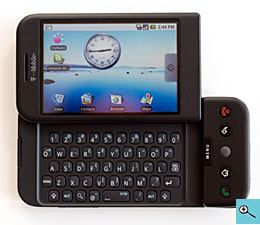
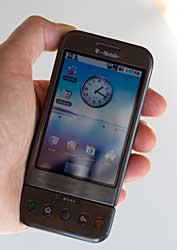
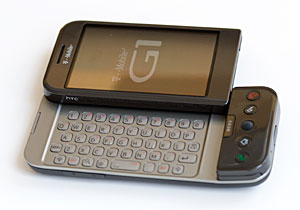
The G1 is manufactured by HTC, a well-known and respected Windows Mobile phone maker, and quality is up to their usual good standards. The G1 has a SideKick-style slide-up keyboard, but there's only one hand grip on the right side. It's easy enough to hold the device without dual grips zones, but the right hand prominence, where the buttons and microSD card slot reside is a bit bulky. The phone's design is both interesting and plain-- it won't win any beauty contests. It's currently available in brown (reminds us of a UPS truck) and black (Editor's note: it's now also available in white with a gray back). The black model is all black while the brown version has a silver keyboard with mid-gray letter masking that's hard to see. The black version's keyboard has white letter masking that offers better contrast.


The brown G1 with silver keyboard.

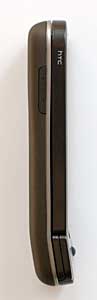
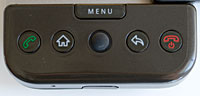
The 5.6 ounce Google phone is on the large side, but Sidekick and HTC Wing users will feel right at home. The soft plastic back has a subtle soft touch finish that helps it stay safely in hand and the handset feels balanced in both portrait and landscape orientations. There are buttons for call send and end, but the call end button doesn't close applications as it does on most phones; it merely turns the screen off, and if long-pressed turns the phone off (with and additional confirmation dialog). Instead you'll use the Home button or back key to return to the home screen or back out of an application. The left side has volume up/down buttons and the right side has the camera button. The HTC ExtUSB port (same as that used on recent HTC Windows Mobile phones) is at the bottom. This port is used for charging, USB and for the included stereo earbud headset. Alas, there's no 3.5mm standard stereo headphone jack, which is unfortunate since the phone also lacks Bluetooth stereo A2DP support.


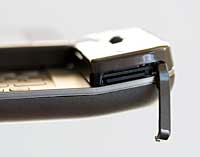
To access the SDHC compatible microSD card slot, you must slide open the display to reveal the keyboard, since the display section blocks the edge of the slot cover. You can hot swap cards without using the rooted-in-Linux unmount card option in settings. The phone can also format the card and provide information about free space. The G1's camera application requires that a card is installed before you can take photos. No idea why it won't save images to internal memory.


Video review

Here's our 10 minute video review of the T-Mobile G1, covering the web browser, maps with GPS, games, Android Market (application downloads) and the user interface.

Phone Features

The T-Mobile G1 is a quad band GSM phone with EDGE and 3G HSDPA on T-Mobile US' 1700/2100MHz bands. The SIM card lives under the back door and the phone is locked to T-Mobile. The G1 has good reception on EDGE/GSM compared to a range of T-Mobile and unlocked GSM phones. HSDPA reception in the Dallas metroplex has been good, though we still have relatively little to compare it to since T-Mobile has few 3G phones given the newness of that network. The phone supports common call features like call waiting, call hold and it even has a voice dialing application. When the keyboard is closed, you'll use a large on-screen dial pad to make calls. When the keyboard is open, you must use the keyboard which has a traditional computer keyboard top number row rather than an embedded phone-style number pad. We're not sure why HTC, Google and T-Mobile decided to kill the on-screen dialer when the keyboard is open.

Texters will likely love the hardware keyboard, and in fact that's the only option-- there's no on-screen keyboard in any application! That may come as a part of the "Cupcake" branch of Android OS updates some time in 2009. Likewise A2DP and video recording might come if and when Cupcake makes it to the G1.

Call quality is excellent on both ends when on 3G and even GSM (3G offers better voice quality than GSM). Call recipients commented that this was one of the loudest, clearest phones they'd heard, even when we were using a Bluetooth headset.

Display, web, messaging and email

The G1's 320 x 480 display is sharp, bright and a pleasure to use. When set to max brightness, the display is as bright as the iPhone's, though this setting will reduce battery life, and half brightness looks plenty good enough. Though the phone has an accelerometer, the OS and built-in applications don't make use of it to set screen orientation. Instead the display is set to portrait mode when the keyboard is closed and landscape when the keyboard is open. The G1 changes screen orientation quickly and graphics are responsive overall. 3rd party applications can make use of the accelerometer: for example we downloaded a free video player that switches to landscape mode when the G1 is turned on its side.

This is one of the few touch screen phones whose screen is viewable outdoors in sunlight-- good going, HTC. It's a capacitive touch screen, which means it needs your touch to work, or at least something organic. That means a finger, elbow or pear will work but not a stylus, pen butt or fingernail. The 3.2" display is large enough to make photo viewing pleasurable and web pages easy to read without zooming. Unlike the iPhone and Nokia S60 webkit based browsers, Google's web browser doesn't rely on page overview mode. Initial web page views are zoomed in to a section of a web page at a readable resolution. When you touch the screen, zoom in and out buttons appear, and you can scroll by dragging the page with your finger or using the excellent jog ball that reminds us of the BlackBerry.

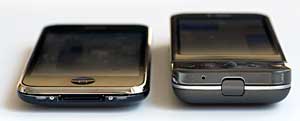
iPhone 3G and the -Mobile G1 Android phone.

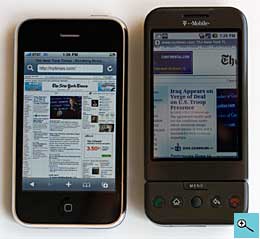
The web browser does an excellent job of rendering full HTML web sites, and you get the full version of sites like CNN and the New York Times by default. T-Mobile's 3G network is alive and kicking in our area and web pages downloaded reasonably quickly over their network. We averaged 900kbps on the DSL Reports mobile speed test, which is pretty good, but found that pages didn't download as quickly as they did on the iPhone 3G. This has more to do with the browsers' rendering speeds than the network connection, since the same was true over WiFi.


The iPhone 3G and T-Mobile G1 displaying the New York Times home page.

Google has two email clients on board: one for Gmail and another for POP3 and IMAP email accounts. The Gmail client is lovely, handles HTML email beautifully and it can view Office but not PDF attachments. The other email application can't view the same attachments-- go figure. There is no Office suite on board, something that will likely turn off hardcore smartphone and business users. There's also no support for MS Exchange, BlackBerry email or VPN connections. We love the notification icons and quiet tones that notify you of new Gmail, email and text messages among other things.


The T-Mobile G1 and the HTC Fuze.

Like the Sidekick, the G1 is a messaging demon. The included IM application handles Google Talk, Windows Live Messenger, Yahoo and AIM. All the important items are here: friend lists, new message notifications (visual, auditory and vibrate) and the app can run in the background.

GPS

Like the iPhone (we get to say that a lot for this review), the T-Mobile G1 has Google Maps and an internal GPS. By default, the GPS is turned off in settings and the phone instead relies on cell tower triangulation to estimate your location. Turn on the GPS to get an exact location, and you'll see a little symbol in the top menu bar in Google Maps indicating the phone is using its GPS chip. We have two G1 phones in-house for review, both running identical firmware. Oddly, one was quite poor in terms of GPS reception while the other was average compared to other non-SiRF GPS-enabled phones. We'll use the better one for our discussions here and assume something was amiss with the weaker unit. The GPS has a hard time getting a satellite fix indoors, but did a fine job outdoors with clear access to the sky. Cold fix times were ~45 seconds while warm fixes were 20 seconds or less. Google Maps works much like it does on other smartphones and the iPhone. You can tell it to locate you, and it will download a zoom-able map of your area. There are options for text-based and map-based directions (no spoken directions), compass display and several maps views. These include map, satellite, traffic and street view. This is the first time we've seen street view on a phone-- very cool and useful if you're trying to ID landmarks at a new destination. There is no charge for using Google maps, though you must have a T-Mobile data plan to use it when away from a WiFi access point (so it can download maps).

Camera

The T-Mobile G1 has a 3.2 megapixel camera with autofocus lens. Still image quality is similar to HTC's Touch Diamond and HTC Fuze whose cameras have identical specs. Contrast and sharpness are higher on the G1 however, and it loses the ability to shoot video. Likewise gone are camera settings of any kind! The only settings available pertain to saving GPS info with pictures and whether to prompt to save/delete after capture. Thus all JPEG photos are shot and saved at the highest quality setting, which averages between 400 and 800k per image. The camera only saves images to a microSD card, which is unusual. There's no flash, so forget night shots.

WiFi and Bluetooth

The Google phone has WiFi 802.11b/g with support for WEP and WPA encryption. In our tests it made reliable connections with good transfer speeds and good range. Given T-Mobile's small initial 3G footprint, WiFi is an excellent consolation, especially indoors where the 3G signal may not penetrate well since it runs at the high end of the spectrum. WiFi does impact battery life, and the G1 doesn't have the best battery life to start with. In our 3G coverage area, the G1 barely made it through the day with moderate to heavy use and no WiFi. With WiFi on, we had to charge the phone by 4pm. Keep in mind that with light to moderate use, the phone should last the day, even with an hour of WiFi use.

Bluetooth profiles are limited, though Google will likely add more in the future. Right now there's only support for Bluetooth headsets. In our tests with a variety of mono Bluetooth headsets, the G1 had good audio quality and volume (HTC generally does a good job with Bluetooth headset support).

Battery Life

The G1's 1150 mAh Lithium Ion battery has less capacity than the average smartphone battery and it shows. As we mentioned, the phone lasts just a day with light to moderate use, and less than a day with heavy use. WiFi and the GPS really drain the battery fast, so turn those off when you don't need them. Likewise, if you turn of automatic PIM syncing, battery life improves a bit (though you'll have to remember to sync manually to get updated contacts and calendar items from the Google cloud). The battery lives under the back cover and is user-replaceable, but finding a spare seems impossible even several months after the G1's launch.


Conclusion

The T-Mobile is a great start for Google's first Android phone. While it might lack features like video recording, A2DP and a built-in video player, usability is top notch and the core functions work well: phone, web and basic email. The G1 isn't a good fit for business users given its lack of desktop and Exchange syncing and its Gmail, POP3 and IMAP-only email support. But for the casual phone user who wants a good touch interface and more application expandability than a feature phone offers, the G1 is a good choice. It's not the multimedia maven that the iPhone is, but it does have copy and paste and you can add your own ringtones easily wink.

Pro: Fast and responsive, very easy to use, easy to download applications via the Android Market directly to the phone. Very good capacitive display, good camera photo quality and obviously excellent Gmail support. Excellent call quality.

Con: No 3.5mm headphone jack, can't shoot video, no A2DP, keyboard on brown model lacks contrast. On-board multimedia applications are weak other than the good mobile YouTube player. No desktop or Exchange syncing.

Price: $179 with 2 year contract, $299 with a 1 year contract. Also available on FlexPay no-contract plans for full retail $399.


Web sites: www.t-mobile.com, www.htc.com, code.google.com/android

Specs:

Display: Color TFT 3.2", 320 x 480 resolution capacitive touch screen that supports both portrait and landscape modes.

Battery: Lithium Ion rechargeable. Battery is user replaceable. 1150 mA. Claimed talk time: 5.8 hours on 3G and 6.76 hours on GSM.

Performance: 528 MHz Qualcomm MSM7201A processor. 192 MB built-in RAM. 256 MB Flash ROM.

Size: 4.60 x 2.16 x 0.62 inches. Weight: 5.6 ounces.

Phone: GSM quad band with EDGE, dual band 3G HSDPA on the 1700/2100MHz bands. Up to 7.2 Mbps download with support for 2.0 Mbps HSUPA uploads. Sold SIM locked to T-Mobile.

GPS: Yes, internal GPS and can use tower triangulation as well.

Camera: 3.2 MP with autofocus lens.

Audio: Built in speaker, mic and HTC ExtUSB stereo headphone jack. Music player included. Ringtone formats supported: AC, AAC+, AMR-NB, MIDI, MP3, WMA, WMV.

Networking: Integrated WiFi 802.11b/g and Bluetooth 2.0 +EDR.

Software: Google Android operating system running on Linux 2.6 kernel (open source). Software included: alarm clock, calendar, contacts, g-mail application, e-mail application (POP3 and IMAP), music player, youtube player, web browser, Google Maps, Android Market, IM client, SMS client, MyFaves, Amazon MP3 store, calculator, voice dialing, photo viewer and settings.

Expansion: 1 microSD card slot, SDHC high capacity card compatible.

In the box: G1 phone, slip case, world charger, stereo earbud headset, strap, getting started guide.


Samsung Moment

Posted By Denys Java 0 komentar


Suddenly Android phones are popping up everywhere (OK, except on AT&T as of this writing): Verizon has the Moto Droid and T-Mobile has three Android phones. The Samsung Moment is Sprint's second Android Google OS phone, following up on their September 2009 release of the very capable HTC Hero. What does the Moment offer that the Hero doesn't? An 800MHz CPU, hardware QWERTY keyboard and a vivid AMOLED display. What does the Moment offer that no other Android phone in the US offers to date? That obscenely colorful and striking AMOLED screen. Though we expect the Samsung Behold 2 on T-Mobile to offer an AMOLED display (but no keyboard) when it ships sometime later this year.

The Moment is a vanilla Android phone running Google OS 1.5 Cupcake. That means there are no customizations like HTC Sense found on the Hero and it's up to you to customize the home screen and other aspects of the phone. Not that this is a bad thing since there are free widgets aplenty to liven up your home screen and a solid selection of free and paid apps in the Android Market. At the same time, this is a new phone yet it runs an older OS than the Google OS 1.6 MyTouch 3G on T-Mobile and the OS 2.0 Droid on Verizon. That means you miss things like enhanced search from 1.6 and Google Maps with spoken navigation and native MS Exchange sync from 2.0. As a consolation, Google's voice directions are in beta and aren't as reliable as Sprint Navigation and Samsung has included Moxier's Exchange ActiveSync solution on the Moment.

The Samsung's specs are good: an 800MHz ARM 11 CPU (previous Android phones went with the ultra-common 528MHz Qualcomm CPU, except the Droid which has a spiffy Cortex CPU), a 3.2" capacitive touch screen running at the same 320 x 480 resolution as HTC's Android phones and the iPhone 3GS, WiFi, a GPS that works with both Google Maps and Sprint Navigation, EV-DO Rev. A, a 3.2MP autofocus camera and Bluetooth with A2DP stereo. Not bad for $179 with a 2 year contract after rebates.


The T-Mobile myTouch 3G by HTC and the Samsung Moment.

Design and Ergonomics

In terms of looks, the Samsung isn't sexy nor is it slim. It's solid and functional: call it the Toyota Camry of phones. There are plenty of Samsung TouchWiz phones that look similar (Samsung Rogue, Samsung Impression), so you won't be unique on the information and telecommunication superhighways but you know you can trust your ride. Samsung does nothing to hide that this is a plastic phone but it doesn't scream "plastic" like the MyTouch 3G. The downside is that the Moment feels chunky and brickish, though it's really not huge; rather the design isn't slimming. The smartphone may not be huge but it is large, and that affords a decent keyboard that's better in terms of key travel and spread than the Moto Droid. The keys are clicky and grippy and the layout is mostly normal. This is a 4 row keyboard with a dedicated number row and the oversized space key sits in between the v and b keys. The Fn key nudges in on the left, shifting the a key to the right a bit which doesn't take all that much getting used to. There's only one shift key (left) and four arrow keys on the right that don't require an Fn key press.


The slider mechanism feels good and locks open securely while having a little play when closed. The soft touch finish on the back is much appreciated since it's grippy and doesn't show fingerprints as do gloss phones. The volume buttons are on the left side and dedicated camera and voice command keys are on the right. The Samsung Moment has a 3.5mm stereo jack up top under a rubber cover. It has a Samsung blade connector for charging and USB data transfer (there is no syncing over USB with vanilla Android phones, the phone's SD card merely mounts as a mass storage device).

The phone has standard mechanical call send and end buttons and touch sensitive (non-moving) Home, Menu and Back buttons. These work fine but unlike the Moto Droid they lack haptic feedback so you get absolutely no tactile feedback when touching them which is disconcerting. The AMOLED display is stunningly colorful and bright-- hands down it's the prettiest Android display on the US market, though it's not the highest resolution-- that award goes to the 480 x 854 pixel Droid. Photos and videos look better than they really are and web pages pop.

Phone and Internet

The Moment has mid-level reception and very good voice quality. Calls are clear and natural sounding on both ends and the volume is good. Nuance's very good voice command software is included and there's a dedicated button for safe dialing on the go. Nuance uses speech recognition so there's no need to record voice tags. The phone supports Bluetooth headsets as well as stereo headsets using the A2DP profile. Android phones support favorites and you can put shortcuts to folks in your address book on the 3 screen desktop. There's a proximity sensor on board so the phone's screen turns off when you hold it against your face and turns on again when you move it away from your face. Bye-bye cheek dialing.


Data speeds over Sprint's EV-DO Rev. A network were good as per usual and the Moment loads web pages quickly. WiFi is there just in case you're out of Sprint 3G service range and we had no problems connecting to public and encrypted WPA WiFi networks. The Samsung uses Google's Webkit-based browser and it does an excellent job of rendering desktop sites accurately and quickly. You can zoom using on-screen controls or by double-tapping a web page (there's no multi-touch pinch and zoom). Android doesn't yet have Flash support but it does support mobile YouTube format via the dedicated YouTube player and for videos embedded in web pages. The high quality setting looks quite good and fills the screen. As per usual with Android, there are separate icons for Gmail and email. You can set up multiple email accounts in the email client and Samsung includes Moxier's Exchange ActiveSync client that supports push email with Exchange Server 2003 and 2007 as well as contact, calendar and task syncing. If you use the MS Exchange feature you'll also get an icon for work mail and work tasks. Finally there's Messaging which handles text and MMS (Picture Mail in Sprint-speak).


Sprint and Samsung include an all-in-one IM client that handles AIM, Yahoo and Windows Live IM, and as always with Android, Google Talk is built-in. A Facebook widget is included and you can download Twitter and MySpace clients from the Android Market.

Multimedia

Nope, there's no easy media syncing here. Drag your music and videos to a microSD card or buy and download tunes from the included Amazon MP3 player store. It's obviously not hard to drag MP3 and AAC files to a card, but those of you who want to quickly and easily sync several hundred songs will be bummed with the state of Android. Want to insert or remove the microSD card? You'll have to pull the battery to do so. Video format support is pretty slim with MPEG4, H.264 being the format of choice. Fortunately that's a popular format that's used to rip movies and videos to iPod and iPhones, so there are plenty of how-to's on the web and ready made movie trailers in that format. The Moment's 800MHz CPU really helps with video playback and we had no problems with a 720 x 360 MPEG4 trailer encoded at 1,000kbps-- something that choked the T-Mobile G1 (the first Android phone).

Sprint TV is on board-- they manage to get this client on every one of their phones, no small accomplishment. Video fills the screen but tends to break up into a blocky mess for a second or two every 30 seconds, which isn't that unusual with Sprint TV. When we tested Sprint TV we had half full bars and a decent -db signal. Doubtless with a very strong signal, we would have seen less blockiness. Still, Sprint has a great selection of channels with sports, news, TV shows and movies that will fill the void that commutes and long lines create.


The 3.5mm stereo jack is under the rubber cover on the Moment's top edge.

Music playback sounds good through the stereo jack and Samsung's speakers are as per usual, very good. The phone's loudspeaker is really loud and clear. The Android music player is a decent application that supports cover art, playlists and the usual sorts by artist, album and title. The Moment supports microSD cards up to 16 gigs, so you could carry a large library of music and video with you.

GPS and Navigation

Since this is a Google phone, Google Maps is included. It supports mapping, POIs, on-screen directions, street view maps but not spoken directions (that's in beta and is currently available only on the Droid). We don't have to sell you on Google Maps-- it's great stuff and you've likely used it before on the desktop or on a phone. Sprint Navigation powered by Telenav is also on board and the service is included with Sprint's Simply Everything plans (it's $10/month without). In our tests the phone's GPS got a fix quickly and held onto it in our built-up mixed suburban/urban haunts. Spoken directions are loud and clear thanks to the Moment's good speaker.

Battery Life

The Samsung Moment should be a power hungry phone given the large display, fast CPU and multiple radios, yet it lasted about as long as other Sprint touch screen smartphones. We got 3 days with light use (a few short phone calls, 30 minutes/day web surfing and only Gmail for our email use). With heavy use that included 20 minutes of navigation, 20 minutes of phone calls, playback of a 30 minute Sprint TV episode and Exchange turned on, the phone lasted the day with no problem. Samsung includes a 1440 mAh Lithium Ion battery that's user replaceable.


Conclusion

If you're a Sprint customer and you want an Android phone with a keyboard, the Samsung Moment is it. If you just want a smartphone and don't care about the OS, then Sprint offers quite a few competitors including the HTC Touch Pro2, BlackBerry Tour and soon the Palm Pixi. But we'd say that Android is worth the look: it's a modern OS that's fun and easy to use (though not as brain-dead easy as the iPhone). For those who enjoy Google's services such as Maps, Gmail and YouTube, Android is worth a very serious look. And the Samsung Moment has some good things to offer including a vivid AMOLED display, a decent QWERTY hardware keyboard and a fast CPU. It doesn't stand out in terms of software enhancements as does the Hero or super-high end hardware like the Moto Droid, but it's that Camry that will get you where you want to go with plenty of creature comforts.

Pro: Wonderful AMOLED display, decent QWERTY keyboard, good speaker and has a 3.5mm stereo jack. Fast CPU.

Con: Uninspired looks (though not ugly like the G1), must remove the battery to access the microSD card slot. With Android OS 1.6 and 2.0 devices on the market, we feel a little left out with the Moment's 1.5 OS.

Websites: www.sprint.com, www.samsung.com

Price: $179 with a 2 year contract after rebate

Specs:

Display: 320 x 480 capacitive AMOLED touch screen. Screen size diagonally: 3.2". Supports both portrait and landscape modes, has accelerometer.

Battery: Lithium Ion rechargeable. Battery is user replaceable. 1440 mA. Claimed talk time: up to 5 hours.

Performance: 800MHz ARM11 processor. 260 megs available internal storage.

Size: 4.5 x 2.34 x 0.63 inches. Weight: 5.67 ounces.

Phone: CDMA dual band digital 800/1900MHz with EV-DO Rev. A and fallback to 1xRTT. Comes with Nuance Voice Command software.

Camera: 3.2 MP, can take photos and video with audio.

Audio: Built in speaker, mic and 3.5mm standard stereo headphone jack.

Networking: Integrated WiFi 802.11b/g and Bluetooth with A2DP stereo, AVRC, handsfree, headset, Object push, PBAP, SDAP and GOEP profiles.

Software: Android OS 1.5 (Cupcake). Gmail, Google Maps, YouTube mobile player, Android webkit-based web browser, email (POP/IMAP/MS Exchange using Moxier's Exchange ActiveSync), Nuance Voice Command, Sprint TV, Amazon MP3 Store, Sprint Navigation, Sprint NASCAR Mobile, Sprint NFL Mobile Live, MS Office document viewer, Visual Voicemail, IM (Google Talk, Yahoo and AOL) . Samsung alarm clock, notepad, world clock and stopwatch.

Expansion: 1 SDHC microSD card slot. 2 gig microSD card inluded.

In the Box: Phone, battery, charger, USB cable, 3.5mm stereo earbud headset, 2 gig microSD card and printed materials.