Welcome to My Blogspot

Cell Phones & Plans Tech

Samsung Mondi

Posted By Denys Java Saturday, December 26, 2009 0 komentar


I get the whole handheld computer and ultramobile device space, from the Samsung Nexio of old to the Nokia N810 to today's Samsung Mondi. I don't believe these devices are the answer to a problem nobody had. There are indeed folks who need lightweight mobile computing in their pocket: in the physical sense and in the OS sense. The Mondi is larger than a smartphone but only an ounce or so heavier. It runs Windows Mobile 6.1 Classic so it's instant-on, unlike netbooks. The 4.3" screen is much better suited to web browsing, document viewing and video playback than small-screened phones. The large hardware keyboard makes email and remote access easier. But here's the dilemma: smartphones have gotten larger and more powerful and now they too can handle the jobs done by MIDs (Mobile Internet Device) and make phone calls too (the Mondi doesn't have a cell radio). Samsung knows this too, and so the Mondi has a trump card: WiMAX 4G for faster wide area networking.

Why WiMAX?

Alas, Samsung makes the device but not the network so they're counting on the likes of Clear (Clearwire) and soon Time Warner and Sprint to make that network hum. It ain't there yet, and we're not sure it will ever be compelling now that HSDPA 7.2Mbps is hitting metro areas with HSPA + (21Mbps) coming in 2010 on T-Mobile and LTE looming for Verizon and AT&T. When WiMAX was first touted more than 3 years ago the speeds sounded impressive to a world plodding along on EDGE and EV-DO Rev. 0, but now it's nothing special. Clear's service is currently available in Portland and Salem Oregon, Boise, Las Vegas, several Texas cities including Dallas, Atlanta, the Seattle metro area, Greensboro, Charlotte, Raleigh, Philadelphia, Honolulu and Maui. Though Clear offers home (indoor) and mobile coverage packages, we haven't gotten a decent signal indoors yet in the Dallas and Portland coverage areas. WiMAX requires significant base station density (more dense than cell networks) and at 2.5GHz it's high enough in the spectrum to have trouble with building penetration. Outdoors in a car or at a sidewalk cafe we had no problem getting a 50% signal, but in a house we managed maybe 1 bar with service drops if we wandered too far from a window. Forget hanging out in a large corporate building or big box store unless there's a WiMAX repeater. We hope things will improve, but it's going to take time and money to build out a strong WiMAX network.


Clear has quite a few service plans (and enough overlapping ones to be confusing) but there is a specific Mondi unlimited plan that's currently $35/month for the first 6 months and $45 for the remaining 1.5 years. Download speeds aren't limited as they are on some of Clear's other plans (current max download speeds are approximately 6Mbps (which is slower than WiFi 802.11b's 10 Mbps) and 1 Mbps upload speeds. There is no data cap on this plan. The bad news? They're doing things cell phone style and Clear requires a 2 year contract to get these rates. Month to month rates are higher. Clearly at this point, you're paying a fairly expensive monthly fee for broadband wireless that's not available in many metro areas, nor is it blisteringly fast.


The iPhone 3GS and Samsung Mondi.

A Closer Look at the Mondi

Enough about WiMAX, let's take a look at the Mondi itself. The device looks and feels well-made though we wouldn't call it chic and stylish. It's solid, the QWERTY slider is robust and the keyboard is quite good. It certainly feels worth the $449 price, which is comparable to a touch screen smartphone price without contract extension. The Mondi reminds us of a larger Motorola Droid, with its black rectangular business looks and slide-out QWERTY. The Mondi's keyboard is much better than the Droid's: it's larger and the keys have more travel and tactile feedback. The devices have similar display resolutions but the Mondi's LCD is larger at 4.3", making text easier to read without zooming in. This is a resistive display rather than a capacitive display like that of the Droid and iPhone. That means you'll need to press harder and there's no multi-touch pinch zooming. The good news is that you can use a stylus (Windows Mobile 6.1 is easier to use with a stylus since it's not touch-optimized) or your fingernail to tap on small links and close boxes.

The Mondi has stereo speakers on the top edge that sound reasonably good for a mobile device, a mic, a 3.5mm stereo headset jack (handy not just for music but also VoIP calls), a dedicated camera button and an easily accessible microSD card slot under a plastic door. The Samsung has a micro USB port for syncing and charging and like any Windows Mobile device it can sync over USB to Outlook and wirelessly to MS Exchange servers. A pop-out arm functions as a stand so you can watch videos with the Mondi on a desk or tray table (the Mondi supports a wide variety of video formats including Flash 8) and there are volume controls on the right side.

Though the Mondi is larger than today's bigger smartphones, it's clearly much smaller than a netbook and is pocketable if you have roomy pockets in loose-fitting garments. At 5.39 ounces, it weighs less than you'd expect of a device this size.

The Mondi is not a phone and it doesn't have a cell radio. That means no voice calls unless you use VoIP services like Skype. We tested the Mondi with Skype over both WiMAX and WiFi and it worked fine, even when using the built in speakers and mic (your caller will hear their voice echo back if you don't use the headset though). To use Skype on Windows Mobile you'll need to download and install the application. Each time you wish to use Skype you'll need to run the app and sign in-- there's no turnkey integration with the phone app as there is on the Nokia N900 since there is no phone app on the Mondi (once again, this isn't a phone).

Video Review

Here's our 8.5 minute video review of the Samsung Mondi that shows off the hardware, Samsung custom user interface, WiMAX speeds, the Opera web browser and more.


Performance and Horsepower

The Mondi uses Samsung's own ARM11 family S3C6410 CPU running at 800MHz. That's a lot of high-end processing power and the Mondi makes good use of it when playing back fairly high resolution video in MPEG4, DivX and other formats. We were surprised that the device sometimes lagged in Samsung's custom home screen, whose UI is attractive, finger-friendly and intuitive but not so full of eye candy that it should drag on performance (see our video review to check out the home screen UI). TouchWiz, Samsung's UI for touch screen phones is also on board and we have to wonder why: it really doesn't add to the experience and really slows down the device (fortunately, you need not run it).

After using the HTC HD2 with a 1GHz Snapdragon processor, and noting how that CPU helped speed Opera rendering times (making its EDGE connection feel much faster) we're surprised that neither the 800MHz Mondi nor Samsung Omnia II show much speed improvement in Opera Mobile 9.5. Opera runs about as quickly as on the average 528MHz Qualcomm CPU-- decent but not seriously fast. Samsung customized the Mondi and Opera to support Flash 8 content in the browser (no need for an external player). YouTube uses Flash 8 but Hulu uses Flash 9, so that means YouTube but no Hulu for you. Even over a fast WiFi connection, YouTube standard resolution video played jerkily at about 12 frames per second-- not ideal, but maybe better than nothing. Opera supports a max of 3 windows and oddly it won't let you run Opera and Internet Explorer Mobile concurrently though the OS and device otherwise support multi-tasking.


The mobile equivalent of Windows programs that are standard on Windows Mobile are on board. Office Mobile and Outlook run quickly enough, and the high resolution screen makes reading and editing MS Office documents a pleasure. As a mobile office, the Mondi does the job. For those of you who are still very new to mobile computing, Windows Mobile runs mobile versions of Microsoft applications that have many but not all features of the desktop versions. You can't install programs meant for true Windows PCs and notebooks on a Windows Mobile device. You can download and install additional programs made for the WinMo platform, but you'll need to do that minus the Windows Mobile Marketplace which currently only supports Windows Mobile 6.5 (the Mondi runs 6.1 and there's no word of an upgrade).

The Mondi has 4 gigs of internal flash storage (nice) and an SDHC microSD card slot so you can carry plenty of business documents, maps and multimedia content on the device. It has 256 megs of RAM with 81 megs free at boot, which should be enough memory to keep the device running smoothly. We did notice instability when heavyweight applications were running. For example, we switched out of Route 66 navigation to turn on the WiMAX connection so we could look up POIs and the Mondi slowed to a crawl and had difficulty drawing the home screen background and Start Menu icon.

Camera and GPS

First: the good news. Samsung includes all the hardware you need to use the Mondi as an in-car GPS system: windshield mount and car charger. In fact, these items are handy if you work in a vertical market and need access to your device for any reason while in the car. The Mondi ships with Route 66 navigation software with maps of the US and Canada. Route 66 is more popular in Europe than the US but it nonetheless gives good turn-by-turn directions and has sharp maps. The bad news? The Mondi's GPS seems weak and we had difficulty getting a satellite fix. Indoors there was little hope but outdoors we could get a position fix. Tall buildings and heavy tree cover caused problems for the Mondi on the road but with clear skies it managed to keep up with our location.

The 3 megapixel main (rear) camera has an autofocus lens and it takes reasonably good shots for a camera of that resolution. The camera has face detection, smile detection and panorama mode as well as geotagging. It can shoot decent quality video with audio at VGA 640 x 480 and QVGA 320 x 240 resolutions at approximately 25 fps. The front-facing VGA webcam is for video conferencing though we couldn't find an application to make use of it.

Conclusion

The Samsung Mondi is a powerful handheld, but it feels a bit behind the times now that PDAs have been eclipsed by powerful smartphones that are smaller and equally as capable. The Mondi is the first 4G handheld and that should give it a leg up: it might not have a cell radio but it's capable of fast data connections. Unfortunately, the Mondi is a bit ahead of its time in that respect since WiMAX 4G is currently available in very few metro areas and the download speeds and connection reliability suffer due to poor building penetration. But if you want a very large-screen Windows Mobile handheld to be your mobile office, the Mondi fits the bill and adds a good QWERTY keyboard too. It has WiFi for local area connections when WiMAX isn't available, but if you want Internet anywhere and not just at WiFi hotspots, check the WiMAX coverage maps carefully before taking the plunge.

Pro: Solid build quality, large and sharp high resolution display that's easy on the eyes. Plenty of built-in storage. As always with Windows Mobile, you get excellent MS Exchange support and desktop syncing to Outlook too.

Con: Gets sluggish at times, GPS isn't the strongest, hard to find a good WiMAX signal indoors. WiMAX coverage areas are currently very limited.

Price: $449

Web Site: www.samsung.com

Specs:

Display: 4.3" resistive touch screen. Resolution: 800 x 480 pixels. Has an accelerometer (used mainly in the Opera web browser) and haptic feedback. Has Etiquette mode (turn the device face down to silence alarms).

Battery: Lithium Ion rechargeable. Battery is user replaceable. 1500 mAh. Claimed WiMAX usage times: up to 4 hours. Claimed WiFi usage time: up to 5 hours.

Performance: 800 MHz Samsung processor (ARM11 compatible S3C6410). 256 megs RAM with approx. 81 megs free RAM. 4 gigs internal flash storage.

Size: 4.88 x 3.03 x 0.63 inches. Weight: 5.39 ounces.

Camera: 3MP autofocus main camera, front-facing VGA camera. Main camera features smile shot, panorama mode, anti-shake and face recognition.

GPS: Has GPS and comes with Route 66 navigation software and pre-loaded maps for the US and Canada.

Audio and Video Playback: Built in speaker, mic and 3.5mm standard stereo headphone jack. Voice Recorder and Windows Mobile Media Player 10 included. Video codecs supported: DivX, XviD, FLV3.1, 3GP, AVI, WMV, MP4, H.263,H.264, MPEG-1, RealVideo. Audio formats: MP3, WMA, AAC, AAC+, AMR, AWB, M4A, MP2, RealAudio and WAV.

Networking: Integrated WiFi 802.11b/g, Bluetooth with A2DP stereo and headset/handsfree profiles and WiMAX.

Software: Windows Mobile 6.1 Classic operating system. Microsoft Mobile Office suite including Mobile versions of Word, Excel, PowerPoint (view only), Internet Explorer, and Outlook. Also, Terminal Services, MSN Instant Messenger for Pocket PC, Windows Media Player 10, Solitaire, Bubble Breaker (game), Voice Recorder as well as on-screen keyboards. Additional applications: Opera Mobile 9.5, Camera, WiMAX connection manager, JBlend Java VM, Fring, Smart Converter, PowerCalc, GyPSii, ShoZu, Photo Slides, TaskSwitcher, Samsung custom home screen and Samsung TouchWiz UI.

Expansion: 1 SDHC microSD card slot.

In the Box: Mondi, battery, charger, stylus, headset, software DVD with ActiveSync 4.5, Windows Mobile Device Center and Navigation software, car charger, car mount and printed guides.
HTC Snap

Posted By Denys Java Wednesday, December 16, 2009 0 komentar


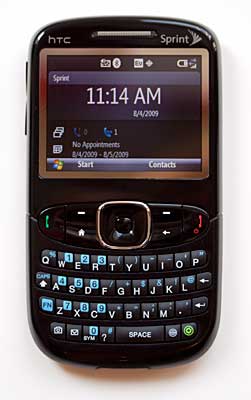
In late 2006 T-Mobile picked up the HTC S620 Windows Mobile non-touch screen phone, and named it T-Mobile Dash. It became one of the best selling Windows Mobile Standard smartphones in the US. Fast-forward three years and HTC now has the HTC Snap as the replacement device for the HTC S620/T-Mobile Dash. This time around three U.S. carriers picked up the smartphone, and it became the T-Mobile Dash 3G, the HTC Ozone for Verizon and the HTC Snap for Sprint. The three variants share the basic hardware specs and designs with minor differences. Among them, the T-Mobile Dash 3G remains most faithful to HTC’s original design for the Snap, and has a super useable BlackBerry-like trackball and textured menu keys. The HTC Snap for Sprint however loses the trackball and textured menu keys; instead it gives us a slippery square d-pad and equally slippery menu keys. The HTC Snap for Sprint makes up for these shortcomings with its fast processor and very strong software and service offerings.

The HTC Snap for Sprint runs on the Qualcomm 7625 processor at 528 MHz. The phone has 192 MB of RAM and 256 MB of flash ROM. The HTC Snap is a CDMA digital dual band phone with EV-DO Rev. A for 3G data. The HTC Ozone on Verizon is a CDMA plus GSM quad band phone for travel outside the U.S., but the HTC Snap for Sprint is a CDMA phone only. In addition to Windows Mobile business-focused software such as ActiveSync for Outlook and Exchange, a mobile version of the Microsoft Office suite, IE 6 mobile and Windows Media Player mobile, the HTC Snap for Sprint also includes a suite of HTC applications. These applications include Comm Manager, YouTube player, MP3 trimmer, Quick GPS, Album photo viewer, RSS Hub, Inner Circle and Streaming Media. Sprint also adds its popular services to the mix and these services include Sprint Navigation which works very smoothly, Sprint TV which doesn’t and Sprint NFL.

The HTC Snap for Sprint runs Windows Mobile 6.1 standard edition (non touch screen edition), and has a 2-megapixel camera, built-in GPS and Bluetooth with A2DP and a microSD card slot. Those who are fond of Wi-Fi will be sad to know that the HTC Snap for Sprint doesn’t have built-in Wi-Fi.

Design

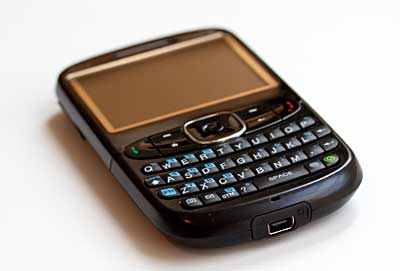
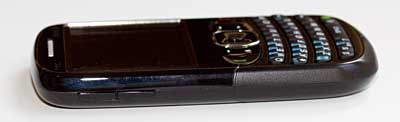
Measuring 4.59 X 2.42 X 0.47 inches, the HTC Snap for Sprint is a slim phone that can easily fit in a pocket. It has a roomy 4-row QWERTY keyboard and the keyboard keys, though not as large as those on the T-Mobile Dash 3G, are very useable thanks to the domed design and good travel. The keys make an audible (but not too loud) clicking sound when you press them, which also helps with typing. The keyboard has several dedicated keys that can launch the camera, messaging, IE and HTC Inner Circle, making the Snap easier to use one-handed. The menu keys and the square d-pad have good size, but they are flat and slippery. Too bad Sprint didn’t go with HTC’s trackball design and textured menu key surface as T-Mobile did. The phone has a 2.4-inch LCD with LED backlighting in QVGA 320 x 240 resolution. The display looks bright and it’s easily viewable outdoors.

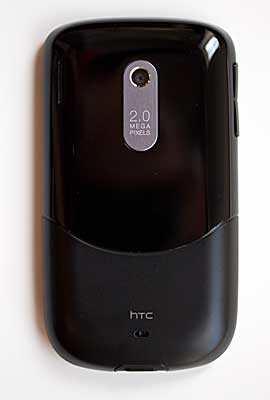
The HTC Snap for Sprint has a two-tone back: shiny on top and soft touch on the bottom. We prefer the soft touch back found on the T-Mobile Dash 3G to the Snap’s since the shiny portion latches onto fingerprints and is more slippery. The rear firing speakerphone and the 2-megapixel camera (no flash) live on the back. The hot-swap-able microSD card slot lives under the battery door. The HTC Snap has the HTC ExtUSB connector at the bottom of the unit, and comes with a dongle that has syncing/charging port, 3.5mm and 2.5mm audio jack as well as HTC’s mini-USB audio connector.

Phone and Web

The HTC Snap for Sprint gets good signal strength and has very good voice quality. Like the T-Mobile Dash 3G, the HTC Snap for Sprint comes with the powerful Microsoft Voice Command which isn’t a standard bundle for all Windows Mobile 6.1 smartphones. Like other Windows smartphones, the HTC Snap has good contacts integration such as smart search (just start typing a name from your database in the dialer screen and the contact will show up after a few letters), creating a contact entry from dialer screen (type a new number in the dialer screen, you will have an option to create a contact entry based on that number), and more.

The HTC Snap has a sliding panel UI with HTC Home Screen, which is conducive to one-handed operation. The HTC Home Screen has quick links to your messages, web pages, weather and more. By sliding the panel with the d-pad you can launch applications with one button press or get info right on the panel panes. The smartphone supports most email services including Outlook, POP3/IMAP4 and web-based email. The device can also work with VPN and Exchange, and it comes with ActiveSync 4.5, Windows Mobile Device Center and MS Outlook 2007 60-day trial on a CD.

The HTC Snap for Sprint has Internet Explorer 6 Mobile which loads web pages fairly quickly. IE 6 Mobile does a better job of rendering full HTML web sites and it supports more advanced features than the last version of IE. The Snap handles most web page layouts well with images and tables intact, and the phone has Flash Lite 3.0 support.

GPS

The HTC Snap for Sprint has a built-in GPS that works with Sprint Navigation. Like most HTC smartphones on the market, the HTC Snap comes with HTC’s Quick GPS app that gathers satellite info and speeds up the position fixes. The Snap indeed gets fixes very fast and has good speed for trip routing. The route calculations are accurate, and turn-by-turn directions and real time maps are right on target. The phone has a loud speakerphone for voice guidance; when the volume is turned to max the phone can overcome highway noise. Sprint Navigation services aren’t free ($9.99/mon.) but it does offer some extra services other than routing and directions. These services include traffic info, POI search, share addresses with friends and family, a compass and more.

Multimedia

The HTC Snap for Sprint is actually a good music player thanks to the included wired stereo headset, A2DP Bluetooth stereo, Windows Media Player and the ability to shop music from Sprint Music Store over the air for $0.99/song. Music playback is loud and has good audio quality via the built-in speakerphone, but it sounds a lot fuller with stronger bass via the included wired stereo headset. We also tested music playback through Bluetooth stereo headsets via A2DP and liked the audio quality. Over-the-air music downloads are fast thanks to EV-DO Rev. A data speeds (the CDMA network version of 3G), and Sprint Music Store sells most tracks for $0.99. Window Media Player can play music in AAC, AAC+, eAAC+, MP3 and WMA formats, and video in WMV, MP4, AVI and 3GP formats. Novice Windows phone users should know about some of the quirks in Windows Media Player Mobile. For example, after you insert a microSD card loaded with music or download music tracks over the air, the player doesn’t automatically scan for and see these newly added tracks. You must go to Menu/Update Library first to add the new tracks.

Above: the Sprint HTC Snap and the Dash 3G.

The HTC Snap for Sprint supports Sprint TV, but these on-demand videos don’t play smoothly on the Snap. There are very noticeable frame drops and long delays in refreshing so parts of a video get skipped as the phone tries to catch up. This happens to both short videos like news bits and full-length TV episodes even when the EV-DO signal is strong. If Sprint TV is a must for your smartphone, check out the Palm Pre which has better Sprint TV video performance.

HTC is kind enough to include their own YouTube player on the HTC Snap for Sprint. The YouTube player allows you to stream YouTube video without using a web browser, and the videos play smoothly with the correct aspect ratio and audio in sync with video.

Camera

The HTC Snap has a 2-megapixel camera with a fixed focus lens and no flash. Photo quality is good by 2 megapixel camera phone standards and pleasantly surprised us. Still images are pleasing with noticeable over-sharpening, but colors look balanced. Outdoor photos look a little overexposed. The lack of flash hurts a bit in poorly lit environments. The Snap also can record video with audio at QVGA resolution. The videos look reasonably smooth with audio in sync to the video.

Battery

The HTC Snap for Sprint has a removable and rechargeable Li-Ion battery that’s 1500 mAh in capacity. The claimed talk time is 4.6 hours, which was on target in our tests. The claimed standby time is 13.3 days, and we got just a little over 10 days in our standby tests. The battery drains faster in poor coverage areas, if you use the GPS a lot or if you watch Sprint TV frequently.

Conclusion

We’ve waited a long time to see a follow-up device to the T-Mobile Dash, and the replacement doesn’t disappoint. This time around three U.S. carriers jumped on board. The HTC Snap offers Sprint customers the newest Windows Mobile non-touch screen smartphone with a nice HTC slide panel Home Screen, updated Internet Explorer mobile, tons of HTC software and popular Sprint services. Sprint still offers the Samsung Ace because that’s the only Windows Mobile non-touch screen smartphone that’s also a world phone with GSM outside of the U.S.. Sprint’s price for the HTC Snap isn’t particularly competitive against the HTC Ozone on Verizon but it is better than the T-Mobile Dash 3G. The Sprint version of the Snap doesn’t have built-in Wi-Fi or GSM for International travelers. We wish every HTC Snap variant had kept the trackball design and the smooth soft touch back. But if you are a Sprint customer looking for a non-touch screen Windows Mobile phone, the HTC Snap is hard to pass up.

Pro: Slim phone, good QWERTY with dedicated keys to launch most used apps. Strong software bundle. Sprint Navigation works smoothly with the GPS.

Con: No trackball, Sprint TV isn’t smooth. No Wi-Fi.

Price: $149.99 with a 2-year contract after mail-in rebate. $399.99 without a contract.

Web sites: www.htc.com/us/, www.sprint.com

Specs:

Display: 65K color TFT color LCD. Screen size diagonally: 2.4". Resolution: 320 x 240, landscape orientation.

Battery: Lithium Ion rechargeable. Battery is user replaceable. 1500 mAh. Claimed talk time: 4.6 hours. Claimed standby time: 13.3 days.

Performance: Qualcomm MSM 7625 processor running at 528MHz. 192 MB built-in RAM. 256 MB Flash ROM.

Size: 4.59 x 2.42 x 0.47 inches. Weight: 4.23 ounces.

Phone: Dual-band 800/1900 MHz, CDMA2000, 1xRTT and EV-DO Rev. A.

Camera: 2.0 megapixel with fixed focus lens (no flash or self-portrait mirror). Camera can also record video with audio.

Audio: Built in speaker, mic and HTC ExtUSB stereo headphone jack. Voice Recorder and Windows Media Player 10 Mobile included for your MP3 pleasure.

Networking: Bluetooth 2.0 + EDR.

Software: Windows Mobile 6.1 Standard Edition (Smartphone edition). HTC software includes Album photo viewer, Quick GPS, RSS Hub, Comm Manager, YouTube player, MP3 Trimmer, Inner Circle, Voice Recorder and Streaming Media. Microsoft software includes IE 6, Windows Media Player Mobile, Office Mobile and Live Search. Adobe PDF reader also included.

Expansion: 1 SDHC microSD card slot supports up to 16 GB cards.

In the Box: Phone, battery, printed guide, software CD, world charger, USB cable, stereo earbud headset, dongle adapter that allows you to charge the phone while using a headset (also has 2.5mm and 3.5mm headset ports).

Samsung Comeback

Posted By Denys Java 0 komentar

Full QWERTY phones always sell well here in the U.S., and a full QWERTY with bright colors? Even better. With a chic pearl white casing and a bright red or purple keyboard (two colors are available), the Samsung Comeback t559 looks hip and attractive. In addition to the cool looks and full QWERTY keyboard, the phone has dual displays with a large landscape internal screen, built-in GPS that works with TeleNav, Bluetooth with A2DP, a 2 megapixel camera and a microSD card slot. The Samsung Comeback also works on T-Mobile’s 3G high-speed network and comes with the very capable Netfront web browser.

Compared to current QWERTY feature phones, the Samsung Comeback is much smaller than the giant Samsung Impression but slightly larger than the LG Xenon from AT&T. Measuring 4.33 x 2.20 x 0.73 inches, the Samsung Comeback is noticeably wider and thicker than the Samsung Gravity 2. But what really makes the Samsung Comeback stand out from the pack is the landscape flip that bears a resemblance to the T-Mobile Sidekick minus the swivel hinge. The Samsung Comeback is a good messaging phone, a very decent music player and an adequate GPS navigator.

Design

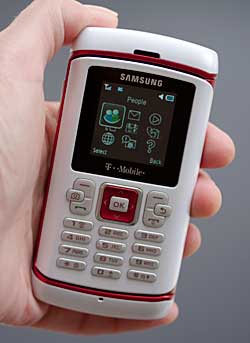
The Samsung Comeback’s design is playful yet with a dash of elegance, and it doesn’t look like “just another QWERTY messaging phone”. The phone has some heft at 4.6 ounces and feels good in the hand, though it does scream “plastic”. The front external display is the smaller one of the dual display, and is 128 x 128 65K PMOLED screen that looks decent in sunlight as well as indoors. The front keypad has slim but wide number keys, and 6 menu keys flank the 5-day d-pad: shoulder menu keys, call send and call end buttons, camera launcher and the back key. The square d-pad is easy to control in most tasks including gaming.

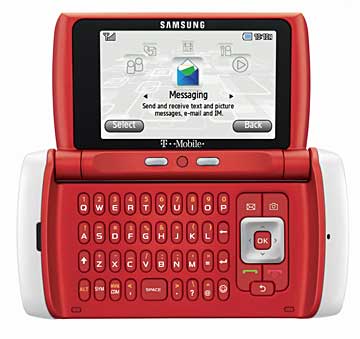
Open the side flip to reveal the larger internal display that’s bright with 240 x 400 resolution and 262K colors. The QWERTY keyboard shares the space with another 5-way d-pad and 5 menu keys (call send, call end, messaging, camera and back). While the menu keys and the d-pad are large enough for most people, the keys on the QWERTY are on the slim side and folks with large fingers might find it hard to type fast on this keyboard. The four-row keyboard offers dedicated keys including “www/.com” for your web browsing convenience and an emoticon launcher. There are also two shoulder menu keys on the inside of the flip just above the keyboard, but oddly they live closer to the center instead of closer to the edges.

The Samsung Comeback has a mono rear-firing speakerphone next to the 2 megapixel camera on the back. The battery covers up both the SIM card slot and microSD card slot. So no hot swappable media cards for you! Side buttons only include the volume rocker and the charging/headset port. There is a strap holder for those who use charms on their phones.

Phone and Web

The GSM quad band + 3G Samsung Comeback doesn’t have very strong reception even in good coverage areas, but it never drops a call. Voice quality is good but not superb. The phone has an address book that can store up to 1,000 contacts and each contact entry can have 5 numbers, 4 email addresses, 3 IM addresses, notes, birthday/anniversary and more. You can also have 8 speed dial numbers. The Samsung Comeback has Nuance’s voice command software that works reliably, but there is no quick way to launch it. Oddly the application lives under Organizer menu and it takes 2-3 key presses to get to the application which isn’t idea for someone who is driving. The easiest way to launch it is via Bluetooth headset. We tested several Bluetooth headsets with the Samsung Comeback, and voice dialing via Bluetooth worked well. The Nuance voice command software can not only voice dial but also launch apps, find contacts for messaging and more.

As a messaging-centric phone, the Samsung Comeback supports SMS, picture messaging with the option to add audio (audio postcard), attaching video to messages, web-based email and IM. The phone comes with a good number of options to set up your message sending and receiving options, templates and more.

The Samsung Comeback has the very capable Netfront v3.5 web browser and it can display full HTML pages with images and layouts intact, though some advanced Javascript still isn’t supported. Web page downloads are fast thanks to T-Mobile 3G HSDPA. Even large pages (like our home page) load reasonably fast (15 seconds). Happily, the Comeback is sold with T-Mobile’s cheaper $9.99/month web2go unlimited data plan rather than their more expensive 3G data plan. You need not get any data plan with the phone, if you have no need for it or want to save money.

Software

There are two ways you can navigate through the applications and launch the most used tools on the Samsung Comeback. With the flip open and the large internal display available, the Samsung Comeback offers a quick launch menu bar that can launch your inbox, the web browser, application list (games, TeleNav, Voice recognition, etc.), my account info and the music player with just one click. With the flip closed, you lose this handy quick launch menu bar on the smaller external screen. Instead you get a Menu key (left shoulder key) that launches a traditional menu structure. Menu labels are bit different in the traditional menu from the quick launcher menu, and all applications are grouped under either the Organizer or Media menu. The lack of consistency means more initial memorization, but it doesn’t ruin the phone’s user experience.

Music and GPS

The Samsung Comeback has a built-in media player that can play music in MP3, AAC/AAC+ as well as WMA and streaming audio formats. The mono speakerphone sounds average for music playback, but thankfully T-Mobile includes the wired stereo headset which has very good audio quality for music playback. The Samsung Comeback also works with Bluetooth stereo headsets via A2DP, and the audio quality is excellent via Bluetooth stereo with good clarity and strong bass. You can either store music on microSD cards using a card reader or copy music files via USB though the phone doesn’t come with a USB cable.

The Samsung Comeback has a GPS and the excellent TeleNav for real time navigation. It’s not free however ($9.99/month), but you get a free trial with the Comeback. The GPS gets fixes reasonably quickly and it gets accurate positions. Route calculation is speedy but the spoken turn-by-turn directions lag just a few seconds behind the real time location when driving at highway speeds. Voice guidance is right on target and you also get POIs searches and traffic reports.

Camera

The Samsung Comeback has a 2 megapixel camera with 2.5x digital zoom but no flash. The camera takes surprisingly good photos by 2 megapixel camera phone standards. Still images look sharp with accurate colors and pleasing contrast. Outdoor shots don’t have a lot of white out and indoor shots, even without a flash, have accurate colors and good exposure though more noise. The camera phone offers the usual white balance, effect settings andit has multi-shot mode. The Samsung can also record video with audio. The quality of the video clips is good for a non-camera-centric phone and playback is smooth with audio in sync with video.

Battery

The Samsung Comeback has a rechargeable Li-Ion battery (AB463651BA model) that’s 960 mAh in capacity. The claimed talk time is up to 5.5 hours and the claimed standby time is 12.5 days. Our test phone didn’t match the claimed battery life, getting about 4.5 hours of talk time and a week of standby on T-Mobile’s 3G network (GSM/EDGE should have better battery life). If you are consistently using the GPS with TeleNav the battery drains quite fast and the phone gets hot. But music playing hardly adds any extra load for the battery.

Conclusion

In the sea of QWERTY messaging phone on the U.S. market, the Samsung Comeback dares to look a little different; and T-Mobile subscribers who have been eyeing the LG enV3 for its form factor now have an answer in the Samsung Comeback. Like the enV series, the external display on the Samsung is nothing to write home about, but the main (inner display) is larger and brighter. The strong messaging features including push messages mean that the Samsung Comeback will compete with the Sidekick LX 2009. The 3G data speed and Netfront web browser make for a good web surfing experience. GPS plus TeleNav services, camera, music and mobile gaming make this a competitive mid-tier feature phone. We don’t dig the external display and people with large fingers won’t like the slim keys on the QWERTY keyboard.

Pro: Cool looks, though plasticky. Good internal display, HTML web browser, very good 3G speed for web surfing, messaging and app downloading. Nice to have TeleNav (though not free) to go with the phone’s built-in GPS.

Con: The keyboard has slim keys, and the external display looks grainy.

Price: $74.99 with a 2-year contract after discount and mail-in rebate. $249.99 without a contract.

Web sites: www.samsungmobileusa.com, www.t-mobile.com

Specs:

Display: 262K-color TFT. Screen size diagonally: 2.6". Resolution: 240 x 400 pixels.

Battery: Lithium Ion rechargeable. Battery is user replaceable. 960 mAh.

Performance: 80MB internal memory. Phone book holds 1,000 entries.

Size: 4.33 x 2.20 x 0.73 inches. Weight: 4.6 ounces.

Phone: GSM quad band world phone with EDGE (850/900/1800/1900MHz) and 3G HSDPA on T-Mobile's US bands: 1700/2100MHz.

Camera: 2MP fixed focus lens with no flash. 2.5x digital zoom. Can shoot photos and video with audio (320 x 240 and 176 x 144 pixel resolutions).

Audio: Built in speaker, mic and Samsung blade stereo headphone jack. Stereo headset included. Has music player that supports MP3, WMA and AAC formats.

Networking: Integrated Bluetooth with headset, handsfree, A2DP stereo, serial port, FTP, basic printing, OBEX (object push), SIM access and DUN profiles.

Software: Traditional grid/rotating menu along with quick launch menu (on internal display mode only). Nuance voice command and voice dialing software included. Netfront 3.5 web browser, SMS/MMS messaging, web-bases email and Instant Messaging, calendar, contacts, tasks, Memo, media player, world clock, stopwatch, timer, file manager, RSS reader, TeleNav Navigator (trial version), alarm clock, calculator and unit converter.

Expansion: 1 SDHC microSD card slot compatible with cards up to 16 gigs.

In the box: the Samsung Comeback phone with standard battery, AC charger, wired stereo headset and printed manuals.

Sony Ericsson W705a

Posted By Denys Java 0 komentar

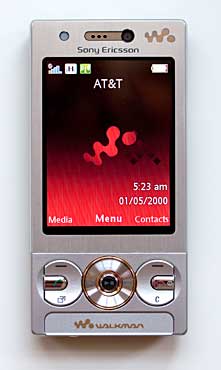
For Sony Ericsson phone fans, the last couple of months have been fruitful: first Sony Ericsson released the unlocked Sony Ericsson W995a Walkman phone with U.S. 3G, then AT&T released the Sony Ericsson C905a killer camera phone and the Sony Ericsson W518a Walkman flip phone. The Sony Ericsson W995a tops the Walkman phone specs among the U.S. models with an 8.1 megapixel camera, U.S. 3G (on AT&T ‘s bands), GPS with Google Maps, a 3.5mm stereo audio jack and more, but it also carries a list price tag of $599. If you don’t care to have a higher megapixel camera on your phone or built-in GPS, you can save yourself $200 and get the Sony Ericsson W705a. The mid-tier W705a Walkman phone has plenty to offer: the same Walkman Player 3.0 with the shake control feature and Sony’s popular XMB user interface, built-in Wi-Fi and Bluetooth with stereo A2DP, FM radio as well as U.S. 3G on AT&T’s bands. Most of the software found on the W995a comes on the W705a as well, and they include the NetFront 3.4 web browser with RSS, YouTube player, PhotoDJ, MusicDJ, VideoDJ, Track ID, Walk Mate and several games. While there is no built-in GPS, the W705a has Google Maps preinstalled.

The Sony Ericsson W705a is a quad band GSM world phone with 3G UMTS/HSPA on the 850/1900/2100 MHz bands. The phone will work on AT&T’s 3G network in the U.S., but it’s EDGE for T-Mobile rather than 3G. The phone has a 2.4” QVGA display, a Memory Stick Micro (M2) card slot and a 3.2-megapixel camera that shoots decent photos and video with audio.

Design

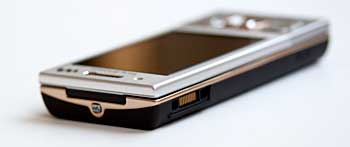
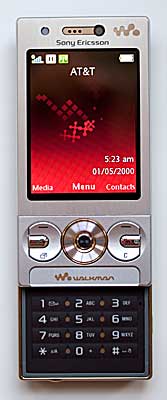
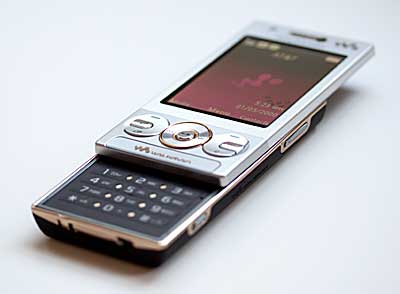
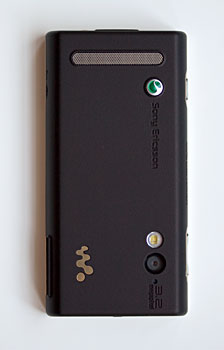
Like the W995a, the Sony Ericsson W705a is also a very compact phone. Measuring 3.74 x 1.88 x 0.56 inches, the W705a is a bit thinner than the W995a. The phone has a modern Euro candy bar style: the silver faceplate and the coffee-colored soft touch back give the phone a classy, modern-minimalist clean look. The W705a weighs 3.45 ounces, and it feels good in hand and looks well built. The display is reasonably bright and color saturated. The d-pad and front menu keys feel sturdy and easy to press. The phone has a slide-out number pad; though flat, the keys are very easy to use and have good tactile feedback when pressed. There is a large strip of speaker grille on the back of the W705a, and the camera with an LED flash also lives on the back. The battery door is very easy to open thanks to a mechanical latch that locks and unlocks the cover. The SIM card lives under the battery door and requires the removal of the battery to gain access. The M2 storage card slot is also under the battery door, but it’s a spring-loaded slot on the side that doesn’t require battery removal. Sony Ericsson includes a 4GB M2 card with the W705a Walkman phone.

The Sony Ericsson W705a has minimal side buttons: only the volume rocker and the camera/camcorder/shutter 3-in-1 button are on the right side of the phone. The Sony Ericsson proprietary Fast Port syncing/charging/headset port lives on the left side, and the phone comes with an in-line adapter and 3.5mm wired headset. The tiny button on top of the W705a is the Walkman Player launcher, and when the music player is launched, the d-pad doubles as music playback controls. There is a phone charm holder on the bottom of the W705a.

Phone and Web

The Sony Ericsson W705a has a better reception than the W995a, getting full signal strength in most places around the Dallas area on AT&T. Voice quality is quite good and the W705a supports most common call features such as call forwarding, call waiting, conference call and more. The phone offers 9 speed dialing numbers as well as voice dialing. Like many Sony Ericsson phones, the W705a’s voice dialing software requires that you record voice tags. The voice recognition works well as long as the same person records and uses voice command. The contacts database can hold 1,000 entries and each entry can have up to 7 numbers. Other PIM software included are Calendar, Calculator, Alarm, Notes, Stopwatch, Tasks and Timer. The Sony Ericsson also has an email client that works with POP3/IMAP4 email accounts, and the phone comes with Sony Ericsson PC Suite and supports MS Exchange ActiveSync. Web-based IM is also on board.

The Sony Ericsson W705a has the Access NetFront 3.4 web browser that’s capable of displaying full HTML pages with all the layout and images intact. Web pages loaded reasonably fast over AT&T’s 3G, but much faster over our Wi-Fi 802.11b/g/n network (the phone supports 802.11b/g). While the Wi-Fi speed is very good, the range is poor. We could get no more than 10 feet between the phone and our Wi-Fi router before the Wi-Fi speed slowed down considerably.

Music and Video

Standard on the current Sony Ericsson Walkman phones, the Walkman Player 3.0 can play music in MP3, AAC, WMA and other formats as well as podcasts and audio books. The W705a has the intuitive Sony Xross Media Bar (XMB) UI for music, video, gaming and other media content navigation. The Walkman music player supports the accelerometer, album art, Clear Bass, Clear Stereo, SenseME and Shake control. The built-in speakerphone is loud and the audio quality sits between the W995a’s speaker and the W518a’s speaker: it’s less tinny than the W518a but it has less powerful bass than the W995a. The music playback is excellent via the included wired stereo headset: it has clear channel separation and powerful bass. The phone also works with Bluetooth stereo headsets via A2DP. Both podcasts and audio books sound good via the wired headset. If you are a fan of listening to FM radio on your phone, the W705a won’t disappoint. Using the included headset as its antenna, the Sony Ericsson works well as an FM radio with RDS info.

The Sony Ericsson W705a can play video in MPEG-4, 3GPP and WMV formats, and comes with a YouTube player. We tested YouTube video playback via Wi-Fi and found video played smoothly with decent audio by mobile YouTube standards.

Camera

The Sony Ericsson W705a has a 3.2-megapixel camera with fixed focus lens and an LED flash. The camera takes good photos as long as you keep the lens cover clean. The phone has a cheap plastic window over the camera lens that attracts fingerprints and grease, which can result in some flare and white haze in outdoor shots and indoor shots that have localized bright halos. But when the lens window is clean, the photos look sharp and colors are balanced. Some outdoor shots have slight over exposure. The camera software offers 4 shooting modes including Panorama and night shot modes, white balance, effects, self-timer and more. The camera phone can also record video with audio in QVGA resolution at 15 fps. Video clips look reasonably sharp and audio is usually in sync with video.

Conclusion

A very strong music phone at a more reasonable price, the W705a is a good all around phone for those who want a Walkman phone but don’t want to sign a 2-year contract or spend $599 list for the W995a. The phone has most of the bells and whistles of a high-end Walkman phone including Walkman Player 3.0, FM Radio, Wi-Fi, Bluetooth with A2DP, 120MB internal memory and a Memory Stick Micro card slot. It also has U.S. 3G and a 3.2 megapixel camera that takes very decent photos for a camera phone in that class as long as you keep the lens clean. You don’t get the GPS and real time navigation on the W705a but Google Maps is pre-installed for maps and directions via cell tower triangulation. Reception is actually better on the W705a than the W995a, and both phones run the same NetFront web browser. With retail discounts we are already seeing, the W705a is a strong competitor in the unlocked Walkman phone segment.

Pro: A stylish phone that looks and feels well built. Strong reception. Good music experience.

Con: Wi-Fi range is poor.

Price: $399.99

Web site: www.sonystyle.com


Specs:

Display: 2.4” QVGA 240 x 320 pixel display with accelerometer, 262k colors.

Battery: Li-Polymer rechargeable, 3.6V (BST-33 model), 1000mAh.

Size: 3.74 x 1.88 x 0.56 inches. Weight: 3.45 ounces

Phone: Quad band unlocked GSM world phone 850/900/1800/1900MHz with EDGE. 3G HSDPA on the 850/1800/1900MHz bands.

Camera: 3.2-megapixel camera with fixed focus lens and LED flash. Takes video with audio in QVGA at 15fps and in MMS resolution.

Audio: Music tones and Polyphonic 72 ringtones supported. Built-in speakerphone, wired stereo headset included, music track controls and volume controls, dedicated Walkman launch key. FM Radio with RDS. Walkman Player 3.0 supports 3GP, AAC, MP4, M4A, MP3, AMR, AMR-WB, WAV, SMF, iMelody, XMF and WMA formats. Has vibrating alert and voice recorder.

Networking: Bluetooth v2.0 + EDR supporting hands-free, A2DP, AVRCP, file transfer and printing profiles. Wi-Fi 802.11b/g.

Software: Sony’s Xross Media Bar UI. Access NetFront 3.4 web browser, Walkman Player 3.0, PhotoDJ, TrackID and Walk Mate included. PIM tools include contacts, calendar, tasks, notes, timer, stopwatch, calculator, light, code memo and alarm clock. Google Maps and YouTube player preloaded. Also included in the package: Sony Ericsson PC Suite 5.0 and Sony Media Go software.

Expansion: 1 Memory Stick Micro (M2) card slot supporting up to 8GB cards. A 4 gig card is included with the U.S. version of the phone.

In the Box: The Sony Ericsson W705a with standard battery, AC charger, audio dongle adapter, 3.5mm wired stereo headset, 4GB M2 card, USB cable, Sony Media Manager software and PC Suite, and printed user documentation.

BlackBerry Curve 8520

Posted By Denys Java 0 komentar

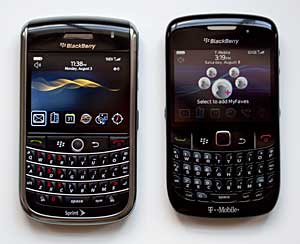
The BlackBerry Tour (Sprint) and the BlackBerry Curve 8520.

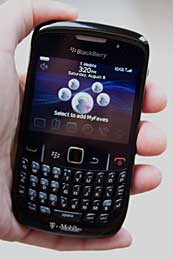
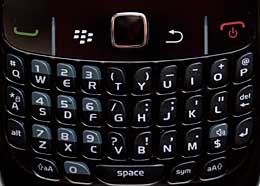
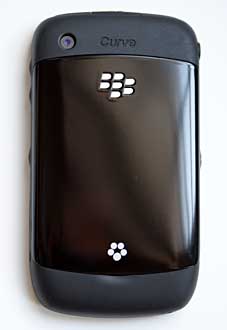
The BlackBerry Curve 8520 aims to go where no 'Berry has gone before, a land with no trackball. RIM's trackball is beloved and like the BlackBerry line, addictive. It's responsive, accurate and more efficient than the much more common d-pad. So why axe it? The trackball does pick up dirt which can affect performance (and require an alcohol rub-down to get working), gets dingy and involves several moving parts (moving parts are more likely to break down). The Curve 8520 instead has a small optical trackpad in place of the trackball and miraculously it works nearly exactly like the trackball. And it moves down and clicks for the center-press action-- nice. No small engineering achievement on RIM's part, the trackpad is great. For those of you who've used the optical pads on Samsung phones such as the Omnia and some imports, this isn't the same animal: it's much more precise and controllable.


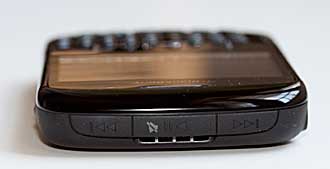
The Curve 8520's other new hardware feature is the music playback control cluster that lines the phone's top edge. All the Berry's edges are rubberized, giving it a rugged feel and the top music controls for track forward, track back and play/pause are under rubber. The controls are easy to use, as are the other under-rubber buttons for volume, camera and voice command.

The BlackBerry Curve 8520 replaces the Curve 8320 on T-Mobile and it's smaller and sleeker looking. The smartphone is available in black and "frost" which is a very dull battleship gray. In black it looks quite good, in frost it looks dull and cheap to us. The Curve 8520 joins the excellent BlackBerry Curve 8900 in T-Mobile's lineup, and that's the 8520's biggest problem. Currently priced at only $20 less, the 8520 has weaker specs in several key areas: lower display resolution, a lower resolution camera and no GPS. If and when T-Mobile drops the 8520's price relative to the 8900, it will make much more sense in their lineup.

The 8520 is a quad band GSM world phone with EDGE for data. It has WiFi 802.11b/g with support for UMA calling over WiFi and T-Mobile's @Home service. As with most UMA phones on T-Mobile, it works very well and call hand-offs are seamless. The phone has a 2.46" QVGA 320 x 240 pixel display, a 2 megapixel fixed-focus camera, Bluetooth 2.0 +EDR and an SDHC microSD card slot.

The Curve runs BlackBerry OS 4.6.1 on a 512MHz processor with 256 megs of flash memory, of which 125 megs are free to store documents and applications. It's responsive and stable.

Looking at the hardware

The BlackBerry 8520 has a few changes in the control cluster: rather than raised buttons for call send/end, menu and back, there are no buttons but rather mechanical switches under the smooth surface. Two raised ridges make it easier to find the "buttons" which would otherwise be lost to the blind finger. The switches do click nicely so you know you've hit the button. The look is modern and trendy, and we've seen the same thing on several recent Nokia S60 N series smartphones.


The QWERTY keys are raised and have a good tactile click. As BlackBerry phones get smaller, so do the keys but we found the Curve 8520's manageable and easier to type on than the Curve 8900's. The key surfaces aren't slippery and they're flat rather than the "wave" style. The keyboard's keys are backlit in white and the control cluster is also backlit in white except the call send and end buttons which are green and red, as you'd expect.

As mentioned, the sides and top and bottom caps are rubberized. A little inspiration from Nextel? But unlike the ruggedized and rubberized Nextel phones of old, the BlackBerry 8520 doesn't look like it was designed to live on a construction site-- it's subtle. Obviously the rubber makes the phone easier to hold onto, and it makes the phone look less monotonous. The front face and rear battery door are shiny plastic. There's no real or faux metal back door here, no Bold leather treatment and the battery door doesn't even get a release latch-- you pry at it to get it off. And yes, those shiny parts latch onto fingerprint grime like crazy, making the 'Berry look hazy.

The microSD card slot is under the battery door, but you need not remove the battery to access the card.

The music playback controls on the top edge.

Video Review
Here's our 7.5 minute video review of the BlackBerry Curve 8520:


Phone, email and Internet

The BlackBerry Curve 8520 is a GSM quad band world phone with EDGE. It will work anywhere GSM service is available. You can make calls over the GSM network or over WiFi if you subscribe to T-Mobile @Home service. The phone hands off calls to and from WiFi seamlessly and automatically uses UMA and the WiFi network if in range of a known and saved hotspot/router. Call quality is good and the volume is good as well. Both incoming and outgoing voice are clear, though call recipients could tell we were on a cell phone (it can't compete with the BlackBerry Bold's simply awesome call quality, but it ain't bad either). Reception is good, and a bit better than the 8900 we reviewed, and the speakerphone is very loud and clear. The 8520 supports T-Mobile's myFaves service and has a theme that puts MyFaves on the standby screen.

The browser is very similar to other recent BlackBerry phones released in the past year. It does full HTML web rendering along with WAP and it offers separate settings for WAP, HTML and Hotspot (WiFi) browsing modes. RIM's browser is showing its age, and it's more prone to Javascript-related slowdowns (this is likely why Javascript is turned off by default), CSS misrepresentations and general layout mayhem. Many full HTML sites look fine, but enough of them have text block overruns, or strange layouts when Javascript is turned off that it's time RIM came up with something that competes with the webkit browsers used on the iPhone, Android and Nokia S60.

BlackBerry email on the other hand, is still the best game in town. If you want push email, support for multiple accounts and that sense that you'll never, ever, ever be out of touch for a moment, the Crackberry is for you. There's also the usual inter-BlackBerry Messenger, SMS, MMS and a host of IM services: AIM, Google Talk, ICQ, Yahoo and Windows Live. T-Mobile's BlackBerry unlimited data plan (BIS) currently costs $25/month and is required with a new contract. Their unlimited Enterprise data plan (BES) is $30/month and there are versions with text message bundles too.

Display and Multimedia

The Curve's 2.46" QVGA display is clear and sharp, though not quite as bright and vivid as the Curve 8900 and Bold's display. It is easier on the eyes compared to the 8900, whose high resolution on a small screen makes for tiny text. The Curve 8520's speaker is very loud and clear, and we had no trouble hearing the soundtracks that accompanied video. The music player obviously works best with a stereo headset (one is included) or A2DP Bluetooth stereo headphones/headsets. The speaker sounds good but no phone's speaker can replace good audio out. The new hardware audio controls work well and certainly are handy, but the media player remains unchanged. RIM's media player is attractive and capable though, and it handles video, music, photos, ringtones and voice notes as well as podcasts. The phone had no trouble playing locally stored MPEG4 videos encoded at QVGA resolution, 650kbps.

The 2 megapixel camera, alas, takes mediocre photos. It has no flash and a fixed focus lens, and indoor noise is particularly notable. Outdoor shots lack good dynamic range and colors are somewhat muted. If photography is your thing, consider the BlackBerry Curve 8900 with its 3.2 megapixel autofocus camera.


Battery

The BlackBerry 8520 has an 1150 mAh Lithium Ion rechargeable battery that's user replaceable. Since the 8520 lacks a GPS and 3G, two battery-killers, battery life is good. The phone easily lasted us 3 days on a charge with moderate use. UMA calling and WiFi are well optimized and the phone lasted 1.5 days with WiFi on and UMA calling active-- better than the first crop of UMA BlackBerry smartphones on T-Mobile.

Conclusion

The BlackBerry Curve 8520 is a solid phone and we found little to dislike. Really, it's hard to imagine a "poor" BlackBerry-- RIM's products are always solidly functional. It looks good in black (you know what we think of the "frost" color), and is sturdy and stable. In fact, it's more stable than the Curve 8900 was at release. The slim feature set might appeal to budget-minded BlackBerry buyers, but the problem is that the more full-featured and higher spec BlackBerry Curve 8900 is currently only $20 more on contract. At that differential, we have to recommend the Curve 8900 over the 8520. But if the prices start to diverge and the 8520 drops to $50 less, then we would recommend it to budget buyers who don't need a GPS or better camera. And if you want to buy a new 'Berry without a contract extension, the retail (no contract) price of the Curve 8520 is $150 less, which makes much more sense.

Price: $129 with a 2 year contract, $299 retail with no contract
Websites: www.blackberry.com, www.t-mobile.com

Specs:

Display: 65K color transmissive TFT color LCD. Screen size diagonally: 2.46". Resolution: 320 x 240 pixels.
Battery: 1150 mAh Lithium Ion rechargeable. Battery is user replaceable. Claimed talk time: 4.5 hours on GSM. Claimed standby: 17 days.
Performance: 512MHz processor. 256 megs flash memory with 125 megs available to store programs and data.
Size: 2.4 x 4.3 x 0.5 inches. Weight: 3.8 ounces.
Phone: GSM quad band with EDGE 850/900/1800/1900MHz. Supports UMA calling- T-Mobile @home service.
Camera: 2.0 megapixel with fixed focus lens (no flash or self-portrait mirror). Can take still photos up to 1600 x 1200 resolution and video up to QVGA 320 x 240.
Audio: Built in speaker, mic and 3.5mm standard stereo headphone jack. Voice Recorder, music and video player included. Has hardware playback controls on the top edge.
Networking: Integrated WiFi 802.11b/g and Bluetooth 2.0 + EDR. Bluetooth profiles: hands-free, headset, serial port, DUN (dial-up networking), A2DP stereo with AVRC, SIM access and phone book access.
Software:BlackBerry OS 4.6.1. BlackBerry push email client. BlackBerry Messaging, SMS and MMS. BlackBerry Maps (free service), Documents to Go standard edition (view and edit but not create MS Office documents), MyFaves, web browser, media player for MP3 and video playback. PIM apps include address book, calendar, tasks and memo. Also Alarm, clock, voice notes, calculator, Password Keeper. Games: BrickBreaker, Texas Hold 'Em Sudoku, Klondike and Word Mole. BlackBerry Desktop software for PC included for syncing and software installation (PocketMac for BlackBerry Mac software can be downloaded for free from RIM's site).
Expansion: 1 SDHC microSD card slot.
In the box: Phone, battery, charger, USB cable, stereo earbud headset, software CD and printed materia

Verizon Escapade

Posted By Denys Java 0 komentar


The Verizon Wireless Escapade is a voice-centric phone made by PCD. This flip phone has CDMA and works exclusively on Verizon's digital CDMA 1X networks in the U.S., and it's also a quad band GSM phone for overseas use. Note that you can't use the GSM radio in the US. The Verizon Wireless Escapade is designed for those who travel overseas often and their main task for the phone is to make voice calls. The Escapade has built-in Bluetooth for mono headsets; aGPS that works with VZ Navigator and a 2-megapixel camera that takes only still images. Since the phone doesn't have EV-DO for fast data, it doesn't support Verizon's V CAST Music, V CAST Video nor does it come with a media player. The Bluetooth doesn't support A2DP, as music playback isn't a built-in option. The Escapade is also missing a microSD card slot.

Design

The Verizon Wireless Escapade has a standard clamshell design and weighs 3.4 ounces. The phone has a 2 inch 262K color main display and a 1.1" 65K color CSTN external display. The standard backlit number keypad is flat but the numbers are large, though not Jitterbug large. The menu keys include two shoulder buttons, a dedicated speaker launcher and a messaging launcher. The d-pad is a decent size but it's also flat and isn't the greatest for playing certain action games.

Side buttons include camera launcher, voice command key and volume rocker. The ports include charging, 2.5mm headset jack and a phone charm holder. The side keys are easy to press accidentally, especially the volume keys as they protrude from the side of the phone.


Phone Features
The Verizon Wireless Escapade gets decent signal strength on 1X but not exceptional. In strong coverage areas, the phone shows full signal strength, but it gets a weaker than average signal in areas that lack very strong coverage. That said, we didn't have any dropped calls even when the signal was very weak. The voice quality is subpar: it has noticeable digital distortion and muddied voice on both incoming and outgoing ends. The earpiece is quite loud and it would be a great phone for noisy places if the call quality were better. The Escapade sounded a bit better via 2.5mm headset, though the package doesn't come with a headset. The speakerphone is very loud, but voice quality isn't good. Our unit's speakerphone sounded very blown even when the volume was turned to medium and low.

The Verizon Wireless Escapade has a phone book that can store up to 500 contacts, and comes with Nuance's excellent voice command software. Voice dialing worked like a charm on the Escapade via both the phone and Bluetooth mono headsets.

The Verizon Wireless Escapade has a full messaging client that supports SMS, picture mail (MMS), web-based email, IM and Chat. The phone also has the Openwave web browser that works with WAP sites and offers basic web browser features such as managing the cache, history, bookmarks and more. It displays full HTML in a single column. Additional PIM tools include calendar, calculator, tip calculator, alarm clock, stopwatch, world clock, unit converter, and notepad.


GPS

The Verizon Wireless Escapade has a built-in GPS that works with Verizon's VZ Navigator smoothly. The GPS gets a fix quickly and tracked our route in the car smoothly. Routing trips and re-routing work well in VZ Navigator and turn-by-turn directions are on target. The 3D map display has occasional delays over 1X but it's still very useable. It's too bad the Escapade's blown-sounding speakerphone spoils an otherwise strong GPS and navigation experience. The Verizon Wireless Escapade also supports Verizon's Chaperone service based on location info.


Camera

The Verizon Wireless Escapade has a 2 megapixel camera that can capture still images only, there's no video recording. The camera takes pleasant pictures by 2 megapixel camera phone standards, and offers self-timer, white balance, color effects and shutter sound settings. Since the phone doesn't have a microSD card slot, it saves the pictures to phone's internal memory (57MB is available). The Escapade offers options to send the pictures as a picture message or to the online album, though when we took pictures at the maximum 2 megapixel resolution (1600 x 1200), the phone said the file size exceeds both messaging and uploading max file size. Thus there appears to be no way to get max resolution photos off the phone (how 90's!).


Battery

The Verizon Wireless Escapade has a rechargeable Li-Ion battery that's 920 mAh in capacity. The battery runtime isn't stellar for a phone that doesn't have EV-DO or a large display, reaching 3-3.5 hours in talk time and about a week in standby. But that's not horrendous either. Because the phone is for the world travelers, it comes with a world charger and a variety of international prong adapters.

Conclusion

For traveling professionals, having the same phone that works in the U.S. and overseas is not only convenient but sometimes crucial for business. The Verizon Wireless Escapade would be the perfect voice-centric world phone for Verizon Wireless customers if it didn't fall short on voice quality and speakerphone quality. The GPS works well with Verizon's VZ Navigator; voice command, messaging and PIM tools are all there. The phone plays games and the camera takes decent pictures though there's no easy way to get them off the phone and onto your computer. While Verizon offers BlackBerry world phones such as the BlackBerry Tour and the BlackBerry Storm, and Windows Mobile world phones such as the HTC Touch Pro2, entry-level world phones with affordable prices and plans are hard to come by. We only wish the voice quality was better on the Escapade.

Price: $29.99 with 2 year contract after rebates
Web sites: www.verizonwireless.com, pcdphones.com

Specs:
Display: Main display: 2" 262K color TFT screen. Resolution: 176 x 220 pixels. External display: 1.1" 65K color CSTN screen. Resolution: 96 x 96 pixels.
Battery: Lithium Ion rechargeable battery, 920 mAh, user replaceable. Claimed talk time: up to 3.5 hours. Claimed standby time: up to 13 days.
Performance: 57MB internal memory. Phone book can store 500 entries.
Size: 3.9 x 1.9 x 0.9 inches. Weight: 3.4 oz.
Phone: CDMA 1X. Quad band GSM/GPRS for overseas only.
Camera: 2 megapixel camera. Still image resolutions: 1600x1200, 1280x960, 640x480 and 320x240. The camera phone doesn't capture video.
Audio: 72 chord Polyphonic ringtone support. 2.5mm headset jack.
Networking: Bluetooth v2.0. Bluetooth Profiles Supported: Headset, Hands-free, Phonebook Access and Object Push for VCard.
Software: Verizon UI. Openwave web browser, Web-based email and IM on board. PIM tools include Contacts, Calculator, Tip Calculator, Calendar, Alarm Clock, Stop Watch, World Clock, Unit Converter and Notepad.
Expansion: None.
In the Box: The Escapade phone with standard battery, AC charger with 3 international power plug adapters, a SIM card and printed guides