Posted By
Denys Java
Thursday, February 4, 2010
2
komentar
Samsung Mythic
When the Samsung Eternity came out for AT&T in November 2008 it sold like hotcakes. Samsung's TouchWiz UI was shiny and fun, the phone was responsive and its data plan cost half the iPhone's. After all, the cost of a phone isn't just the up-front purchase price but the ongoing plan price over a 2 year contract. It was one of the first touch screen phones to have Mobile TV, which is $10/month subscription digital TV that's broadcast over the air rather than via the phone's data connection. If you were lucky enough to live in a FLO TV service area, you saw better video quality than YouTube or AT&T's streaming video could offer at the time.
Since then, we've had the lower end Samsung Solstice which couldn't dethrone the Eternity and now the Samsung Mythic which we'd say is up to the job of replacing the iconic Eternity. Like the Eternity it runs Samsung's TouchWiz user interface; it's still intuitive but after more than a year it's looking a little old. Still, it's one of the better touch interfaces on a feature phone and there's little to no learning curve if you're upgrading from an older model.
The display resolution has increased to 360 x 640 pixels and measures 3.3"; a distinct improvement over the Eternity and the Solstice. It's not a super-vivid AMOLED display like the Samsung Impression TouchWiz phone with QWERTY keyboard though. Nor is it capacitive like the iPhone 3GS. That means it's not as sensitive or responsive, but among resistive screens it's quite good. And better yet, it works with fingernails and gloves.
New phones always cost more, and so the Mythic costs more than the older Impression which arguably beats the Mythic if you don't want Mobile TV, and it costs the same as the 16 gig iPhone 3GS. We expect the price will come down, and as always 3rd party dealers will offer the phone for less, making it more compelling. Our only niggle with the Mythic is that it's not as peppy as the Eternity, something that's hard to forgive in a feature phone.
The Mythic has very good call quality on AT&T's 3G network and the earpiece is louder than average. Likewise the rear-facing mono speaker is loud and clear. The Mythic is a quad band GSM world phone and it's a 3G world phone too, with HSDPA on AT&T's bands and 2100MHz for Europe and Asia. The phone has speed dial and Nuance voice command.
Other features include a GPS that works with AT&T Navigator, a music player (same as that on the Eternity), support for AT&T's streaming video that's included with their data plan, a video player that can handle common formats like WMV and MPEG4, a WAP browser and a more full-featured HTML browser that's developed by Samsung based on webkit (the same browser engine used in the iPhone and Palm Pre). While the browser can't compare to the iPhone's in terms of rendering speed and finger control, it's pretty good by feature phone standards and can handle full desktop sites.
Video Review
Our Take
The Samsung Mythic is a nice touch screen feature phone, and given its lack of competition on AT&T, it's among the best. If you want a touch screen phone but don't want the more expensive smartphone or iPhone data plan, the Mythic is a full-featured choice, though we might still choose the Samsung Impression for its AMOLED display and QWERTY keyboard. But if you don't want the keyboard and added bulk of the Impression or if you do want Mobile TV, the Mythic is it. We just wish it was a little peppier.
Display:262K color TST color resistive touch screen. Screen size diagonally: 3.3". Resolution: 360 x 640, supports both portrait and landscape modes via accelerometer in some applications. Has haptic feedback and proximity sensor.
Battery:Lithium Ion rechargeable. Battery is user replaceable. 1150 mAh. Claimed talk time: up to 3 hours. Claimed standby: up to 10.5 days.
Performance:Undisclosed CPU, 189 megs flash storage. Phone book supports up to 2,000 entries.
Size:4.49 x 2.06 x 0.5 inches. Weight: 3.8 ounces.
Phone:GSM quad band world phone 850/900/1800/1900MHz with EDGE. 3G HSDPA on the 850/1900/2100MHz bands for AT&T, Europe and Asia. Has Nuance voice command and speed dial.
Camera:3.2 megapixel camera with autofocus lens and LED flash.
Audio:Built in speaker, mic and 3.5mm standard stereo headphone jack. Music and video players included.
Networking:Bluetooth. Profiles: headset, hands free, serial port, DUN, A2DP stereo, FTP, Object Push and basic printing.
Software:Samsung TouchWiz UI. Java applications. Apps include Samsung's HTML web browser, WAP browser, Mobile Email, Mobile Video, Mobile TV (requires monthly subscription), music player, video player My Stuff (file manager), Music ID, XM Radio, Mobile Banking and more.
When Google formally announced their first Google-branded phone, the Nexus One, a day before the CES trade show in Las Vegas, they managed to distract technology buffs from the US' largest trade show. Google making and selling their own phone? What's up with that? Unlocked phones with no subsidy haven't sold like hotcakes here in the US where we want it cheap and forego features and freedom to get it cheap. But the Nexus One looked like one heck of a high end Android smartphone with a design that could make the ugly duckling G1 hide in the closet. Finally, an Android phone that still looks good when placed next to an iPhone. In fact, it's marginally thinner and lighter than the iPhone 3GS while finding room for a user replaceable battery.
As it turns out, the Nexus One is what Google calls a "super-phone", and they wanted to show the world what Android could do with really high end specs and a design to match. The hardware is made by HTC, who made the G1, which was the first Android phone. They also make the lovely HTC Hero, the Droid Eris, the lower end MyTouch 3G (aka HTC Magic) and plenty of high end Windows Mobile phones. While HTC's value added has been their Sense UI enhancements for recent Android models, this phone is stock 100% pure Android (Google's completely in charge of the software on this phone, after all). The Nexus One runs Android OS 2.1, and it's the first phone on the market to sport that new OS. It's incrementally better than 2.0 and 2.01 on the Motorola Droid (previously the phone with the latest, greatest OS).
What's really interesting is the hardware, which makes the otherwise mighty Moto Droid look like a mid-tier Android phone. It has a 1GHz Snapdragon processor, 512 megs of RAM, 512 megs of flash storage and an AMOLED display. That CPU is currently the fastest on the market, and it makes appearances only in HTC's HD2 Windows Mobile Pro phone and in the LG eXPO. Android is a more lightweight OS than Windows Mobile, so this thing really flies. No waiting, no delays and no trouble playing fairly high resolution video. Sweet. 512 megs of RAM is unusually high and beats the HD2's 488 megs. No problem running concurrent applications, there's plenty of memory for that.
The Nexus One has a 5 megapixel autofocus camera, a GPS that works with Google Maps, an SDHC microSD card (a 4 gig card is included), WiFi and Bluetooth with A2DP stereo. Even more juicy is the 3.7" capacitive AMOLED display running at the now standard high end smartphone resolution of 480 x 800 pixels. The display and OS support multi-touch but Google hasn't enabled it in their built-in apps for the US version (the Euro version does have multi-touch). Third party applications can and do support multi-touch: we tested the Dolphin web browser which supports pinch zoom and Simply Draw which supports drawing with two fingers (both are free and are available for download on the Android Market).
How You Buy it, How You get Support
The Nexus One is an unlocked GSM phone with quad band EDGE and 3G HSDPA/HSPA 7.2Mbps on the 900/1700/2100MHz bands. It will work with any GSM carrier, but there are no AT&T 3G bands, so that means EDGE only on AT&T. Google sells this phone directly via their website and there will be a version for Verizon this spring and there's a Euro/Asian model that's currently being sold in the UK and some Asian countries (sales will eventually expand to more European countries). Other than language differences and convenient localizations, we don't see a reason why the currently available Nexus One wouldn't work in all European countries. Google does not plan a phone with AT&T 3G at this time.
Google handles selling you the phone, using Google checkout (surprise). HTC handles device support and your carrier (T-Mobile in the case of US customers) handles network and connectivity issues. While phone carriers and manufacturers are well set up to handle support for phones marketed for a particular carrier, this one is a bit more complex. We'll have to see how well the three companies handle it. In the first week, things have been a little rocky according to forums on the Net, but we expect support routing should improve. The phone has a 1 year warranty and Google gives a 14 day trial period. Google applies a restocking fee only if you had it engraved, and if your state requires a longer return period you get longer.
You can buy the phone for full retail ($529) or you can get it with a T-Mobile contract for $179. If you're not out of contract on T-Mobile, there are higher subsidized prices depending on how long you have left on your contract. In Europe, the subsidy is with Vodafone.
The N1 is a well made, solid phone that's neither overly large (it's about the same size as the HTC Hero) nor too heavy at 4.5 ounces. It feels solid and has a pleasing weight in the hand, and the curves make it feel great. It is quite thin and rounded, so we found it easier to drop than some other phones. The bezel is metal as is the back strip where you can order custom engraving.
The front buttons are touch sensitive and they require a firmer press than does the display (as they should or you'd be accidentally pressing them with annoying frequency). We always love HTC's trackball and find it useful on the N1 for working our way through text. The trackball pulses slowly in white when you have a missed call, voicemail or reminder. It could pulse a bit more quickly because it's quite possible to glance at the phone and miss the pulse.
Is it a Superphone?
Well, we'd say it is, if you define a super-phone as a really high end smartphone that offers the best currently available in display technology, horsepower, wireless, modern OS and features. The iPhone 3GS, Moto Droid and Nokia N900 are also super-phones by that definition. Is it the best phone on the market? It's certainly one of the best, but we won't call it the very best since no phone can meet everyone's needs. For example, if you're one of those folks who can't live without a hardware QWERTY keyboard, it's not for you. If you want to spend serious time doing 3D gaming, the iPhone is currently the best. If you want a closed ecosystem that enables one simple and consistent UI and ease of use, the iPhone is for you. If you want the best web browser with real Flash support, the Nokia N900 is better (though Flash should be coming to the Nexus One before the spring of 2010). If you want a very attractive, well-made slate smartphone, one that's very fast, has a stunning capacitive display and full support for Google's myriad services including fast OS updates, then the Nexus One is your superphone. Aside from high end gaming, there are plenty of good apps on the Android Market to keep most folks happy and entertained, and 3D gaming should be forthcoming since Android 2.0 and higher has 3D APIs. Phones like the Nexus One and Moto Droid have the horsepower to handle those 3D games. While Android phones like the Nexus One aren't as super-duper easy to use as the iPhone, they're plenty easy to understand and use. But Android's greater openness and customizability are well suited to power users. For example, I want my calendar, weather and twitter feed on my home screen. I don't want to launch apps and do several finger-taps to see the info most important to me, I want them at a glance. Android wins here, as does the Nokia N900 while the iPhone fails.
The Nexus One's clearest competitor is the Moto Droid on Verizon. They have similar resolutions and screen sizes, and run Android 2 (currently the Droid is at 2.01 while the Nexus One is at 2.1). Their functionality and user experience are quite similar; I wouldn't say the Nexus One hoses the Moto Droid by any means. The Nexus One is however faster, and that's impressive since the Droid is very fast and is the second fastest Android phone on the market. Once I used the Droid, I found it hard to go back to the old technology 528MHz MyTouch 3G, a phone that hadn't seemed slow before. While the Moto Droid pauses ever so briefly when doing things here and there, the Nexus One never does. And the Nexus renders web pages faster, thanks to the 1GHz CPU (the Moto has a new technology 600MHz Cortex A8 CPU, like the also-speedy Nokia N900).
The Nexus One wins on the display front thanks to its AMOLED display which is much more colorful and vivid. Yet it's not overdone and warm tones don't bleed as they often do on mid-tier AMOLED phones. It's also a bit more sensitive than the Droid, which we like. The drawback with AMOLED displays is that they aren't as visible outdoors in bright light (there the Droid wins).
The Nexus One wins against the Droid and iPhone for camera quality, though it can't beat the excellent Nokia N900-- Nokia knows how to do a camera right. The Nexus One's photos and video are much better than the Droid's and its photos are much better than the iPhone 3GS'.
The quad band GSM Nexus One is best used with T-Mobile here in the US since it has 3G HSDPA 7.2 Mbps on T-Mobile's bands. It will operate on EDGE only on AT&T. We've been told that it's forward compatible with HSPA+, a 21Mbsp max data standard that T-mobile is currently trialing in Philadelphia and will deploy in more cities this year and next. Though T-Mobile claims to have upgraded their entire network to 7.2Mbps HSPA, here in Dallas in early January 2010, we're still on the 3.6Mbps standard so we couldn't test the faster speed standard (likewise our N900 and MyTouch 3G don't see 7.2Mpbs yet either, though their hardware is capable). Our data speeds averaged 600-1,000kbps, which is on par with our other T-Mobile 3G smartphones.
Voice quality is excellent thanks to Audience's new A1026 voice processor that works in conjunction with the Google phone's dual mics. It does an excellent job of reducing background noise while keeping voice clear and full. The Nexus One is at the top of the heap for outgoing voice quality. Incoming voice is clear and natural, with average volume. The mono speakerphone, though large, is unfortunately tinny.
The usual suspects are on board for all things Internet and Google: gmail, Exchange mail, POP3/IMAP mail, a very capable webkit web browser, a YouTube player, Google Maps, Google Voice and Google Talk. There is no T-Mobile @Home UMA calling-- Google seems to have avoided carrier-specific features since this is an unlocked world phone. The web browser supports YouTube via Google's YouTube player that plays mobile YouTube video rather than Flash. According to Adobe, Flash 10.1 will be coming to the Nexus One in a few months.
Video Reviews
Part 1 of our video review series covers unboxing, the phone's physical design and comparisons with the Moto Droid, Nokia N900, MyTouch 3G, HTC HD2 and the iPhone 3GS:
Part 2 digs deep into Android 2.1's new features, the web browser, YouTube playback, Google Maps, MPEG4 video playback from a microSD card and 3D gaming:
Android 2.1 New Features
We've covered Android's new features in our second video review, and these include the extended 5 screen home screen, new Google widgets for weather, news and wireless control and the new program launcher. One thing I'd like to underscore is the new speech-to-text feature. Since Android OS 1.6 Donut we've been able to do a Google search using speech rather than a keyboard. In OS 2.1, you can use speech pervasively: the on-screen keyboard has a mic key and if you tap this you can speak rather than type. This works very well and I found myself typing less and less. Obviously, if you're in a quiet place like a library or a very noisy place like a ball game speech isn't the best input method, but it works well most everywhere else. You can tell Google Maps what you're looking for, you can dictate an email or SMS message and voice dial. It takes about 5 seconds for the speech-to-text engine to turn what you've said into text, and we'd like to see this get faster, but that's our only complaint.
Camera
The Nexus One has a 5 megapixel camera with autofocus lens and a single LED flash. Image quality is better than other HTC phones (which might not say much) and is even a bit better than the HTC HD2's 5MP camera. It's still not as good as Nokia's better Nseries smartphones or the N900, but that's a tall order since Nokia makes some of the best cameras on the market.
The N1 lacks a dedicated camera button, so you'll want to put a shortcut to the camera on your home screen. You can take photos by pressing the on-screen shutter button or by pressing the trackball (the trackball method makes for less camera shake). You can't manually select the point of focus by touching the viewfinder, but you can set white balance, color effects, flash mode, resolution, quality and focus mode. The camera supports geotagging. Max video resolution is 720 x 480 at 20fps or higher and there's a lesser resolution for MMS. You can set white balance, color effects and duration.
Image quality is good, with excellent color saturation and balance. There's some visible interpolation (jaggies and overly smooth areas) that put it behind the N900, but it's better than most other smartphone cameras on the US market. Video quality is likewise good with excellent color and good frame rates. This is a camera you'll likely enjoy using.
Conclusion
Google and HTC have a winner with the Nexus One, the "be all that you can" Android smartphone. Google spec-d out a top of the line phone and at the moment, it is the one to beat among Android phones. The Moto Droid comes in a close second with a similar user experience but a weaker though still capable CPU and a lesser camera. Indeed, the Nexus One is a "super phone", but it's not the phone that destroys all others. It's simply got high end everything and the standard Google Android experience. It does run a newer version of the OS, but other Android phones will catch up. That said, Google doesn't have to worry about carrier control with this phone, and so we expect they'll push new OS updates to the Nexus One before other phones. That means by the time other phones catch up with OS 2.1, the Nexus One will probably have something even newer and better. Even if other Android phones come out with similarly compelling hardware, the Nexus One will likely maintain an OS advantage.
The drawbacks? You can't take this phone to your corner T-Mobile store for support. T-Mobile will handle network-related issues but the rest is in HTC and Google's court. Google isn't a company famous for quality human contact, and we'll see if they can handle being a retailer.
Pro: Fast! Very attractive and well made. Simply large and lovely AMOLED capacitive display. Good GPS and Google Maps performance, good camera, has WiFi 802.11b/g (the 802.11n isn't enabled, at least not yet). It's unlocked so you can use it with any GSM carrier, even if you buy it with a contract.
Con:MS Exchange calendar sync over-the-air is currently not working, support isn't as clear cut since this is marketed more like an unlocked phone, no AT&T 3G.
Price: $179 with a new 2 year contract on T-Mobile US, incremental pricing for those not yet out of contract and $529 retail with no contract. Phone is sold unlocked, even if you purchase it with a plan.
Display:AMOLED capacitive touch screen with haptic feedback and proximity sensor. Screen size diagonally: 3.7". Resolution: 480 x 800, supports both portrait and landscape modes via accelerometer.
Battery:Lithium Ion rechargeable. Battery is user replaceable. 1400 mAh.
Performance:Qualcomm Snapdragon 1GHz CPU (QSD 8250). 512 megs RAM and 512 megs flash ROM.
Size:4.68 x 2.35 x 0.45 inches. Weight: 4.48 ounces.
Phone:Unlocked GSM quad band world phone 850/900/1800/1900MHz with EDGE. 3G HSDPA 7.2 Mbps on the 900/1700/2100MHz bands (3G for T-Mobile US, Europe and Asia). Forward compatible with HSPA+. Verizon version will be CDMA with EV-DO Rev. A. Phone is sold direct by Google and not offered through carriers, though it can be purchased subsidized with a contract on certain carriers.
Camera:5.0 MP with autofocus lens and LED flash. Can capture video at 720 x 480 resolution, 20fps or better. Can geotag photos.
GPS:Has GPS that works with Google Maps (pre-installed) and TeleNav (downloadable). Has digital compass.
Audio:Built in speaker, mic and 3.5mm standard stereo headphone jack. Music and video player (Gallery) included.
Networking:Integrated WiFi 802.11b/g and Bluetooth 2.1 + EDR (supports A2DP Bluetooth stereo). The chipset supports WiFi 802.11n but it's not enabled.
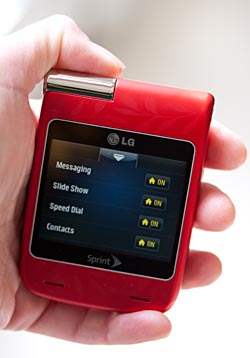
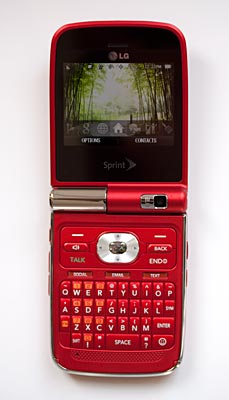
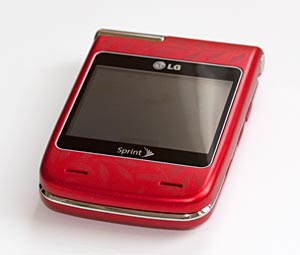
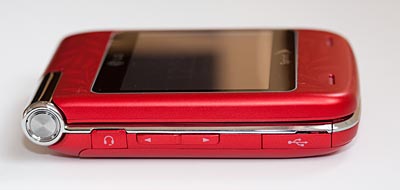
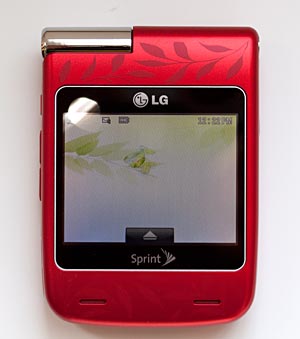
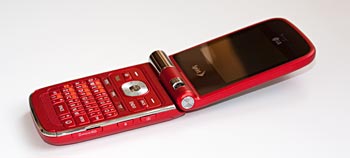
In a competitive market of QWERTY texting phones, the original LG Lotus dared to look different. The square form stood out in a sea of candybar and slider QWERTY phones, and it found an audience among those who like their tech to look different. The Lotus Elite continues in that tradition, and the first model in the new LX610 series dresses in red and aims squarely at female phone buyers (don’t worry fellas, a black version is coming). The new Lotus Elite also adds a large QVGA external touch screen that matches the internal display in both size and resolution. You still get a 2.4” landscape screen on the inside, a built-in aGPS that works with Sprint Navigation, Bluetooth with A2DP, a microSD card slot with SDHC support, EV-DO 3G as well as access to multimedia content from Sprint Music Store, Sprint TV and games.
Design and Ergonomics
Compared to the original LG Lotus, the Lotus Elite looks more refined and better built. It has rounded corners, and the hinge looks strong and moves more freely. The keyboard and the keys also have more pleasing shapes that make the Lotus Elite look stylish. Measuring 3.43 x 2.44 x 0.73 inches, the phone is still quite wide and should be a handful for those with smaller hands. The biggest design change for the Lotus Elite from the original Lotus is the 320 x 240 pixel external touch screen. The internal display isn’t a touch screen but you’ve got the full QWERTY and plenty of hardware buttons to control the phone when the flip is open. We were glad to see that most built-in applications support touch control on the external display, and these applications include the music player, Sprint Navigation, Camera, video, Sprint TV and more. Applications that require the use of the keyboard such as the web browser, games and social networking don’t run on the touch screen. You can check your messages on the external touch screen but you’ll need to open the flip to type and send messages.
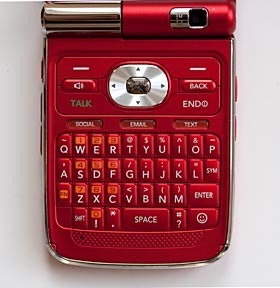
The QWERTY is spacious thanks to the phone’s wide body and the key layout is fairly standard. Since the Lotus Elite targets texters and social networking addicts, the phone has hardware buttons that can launch social networking sites, email and SMS with a single key press. The d-pad is large and works well for gaming. The microSD card slot is easy to access on the side of the phone, and there is a 2.5mm audio jack on the side as well.
The LG Lotus Elite has Sprint’s OneClick UI that launches most commonly used apps with a single click, and you can customize OneClick to include any applications you wish to see there. The carrousel of icons not only launches apps but also provides additional application related actions. For example, when you scroll to the Messaging icon on the carrousel you can actually see how many new messages, emails and voicemails you have; when you are on the Sprint Navigation icon you can go directly to options such as Drive To, Search, Maps and Traffic and Share and more.
Phone Features and Reception
The LG Lotus Elite has great reception and gets full bars in areas with good coverage and more than half of the full strength in areas with just OK coverage. The audio quality is excellent with very clear and loud voice on both incoming and outgoing ends, and it doesn’t have any background white noise. The Lotus Elite has a Contacts database that can store up to 600 entries with each entry capable of storing 7 numbers and full contact info. The phone can also store up to 98 speed dialing numbers and comes with excellent built-in voice dialing and voice command software. You can launch voice command by pressing and holding the Talk button or the Speaker button. The voice command software handles voice dialing, launching applications and checking the phone’s status.
The Lotus Elite supports text messaging, picture and video messaging as well as web-based IM (AIM, Windows Live Messenger and Yahoo Messenger). The phone supports popular POP3 email services including AOL, Yahoo!, Gmail And Hotmail; and it works with Exchange for email and contacts. For accessing the web, the Lotus Elite comes with the Access NetFront web browser (v3.5.1). The browser displays full HTML pages with images and columns altered from their standard desktop layout. The web pages are readable with the default font setting but the browser squeezes the page’s width to fit the phone’s 320 pixel-wide display which results in columns that are one or two words wide but incredibly long (requiring lots of scrolling down and patience).
Video Review
Here's our 7 minute video review of the Lotus Elite:
GPS and Sprint Navigation
The LG Lotus Elite has a built-in aGPS that works with Sprint Navigation. The GPS gets signal and position fixes quite fast and Sprint Navigation loads quickly. Sprint Navigation has real time route calculation, re-routing and turn-by-turn directions with voice guidance. The Lotus Elite is generally quick to calculate routes except at the beginning of a real time navigation session. It takes a bit of time to catch up with the current location, but once it’s found you, it can certainly keep up with your driving. The screen looks good for viewing maps and the speakers are loud and clear for voice guidance. Sprint Navigation (powered by TeleNav) comes with a large selection of POIs and offers local searches and location sharing.
Multimedia
The LG Lotus Elite is a good music phone thanks to the front facing stereo speakers, the support for Sprint Music Store, the microSD card slot and the built-in music player. The phone’s speakers are loud and ringy; audio quality is clear though not terribly full. The Lotus Elite has touch controls for the music player on the external screen to match the outward firing speakers. The phone works well with the Sprint’s Music Store, and the built-in music player can play MP3, AAC, AAC+ and MP4A files. We tested tunes ripped in the iTunes and they played well on the Lotus Elite. The microSD card slot supports SDHC and we tested high capacity cards which worked fine on the phone. The LG Lotus Elite has a 2.5mm headset jack, but it doesn’t come with a headset in the box. The phone also works with wireless stereo headsets via Bluetooth A2DP. We tested the music playback using the Jabra HALO, and the Lotus Elite had some trouble streaming music via A2DP to the Jabra HALO though it had no problem streaming voice calls.
The Lotus Elite supports Sprint TV, a collection of on-demand TV shows, movies and music programs served over Sprint’s data network. The streaming speed is decent on the Lotus Elite, and the video playback has some frame drops but not too laggy as long as you are in an area with decent EV-DO coverage. Sprint TV videos look a little blocky, especially in the full screen mode. The external screen can play Sprint TV content with touch screen controls, which makes a good use of the front speakers.
The large keyboard and the landscape screen provide good controls and display for gaming. Most games play smoothly on the Lotus Elite with good audio and excellent controls. Games don’t usually play on the external screen.
Camera
The LG Lotus Elite has a 2.0 megapixel camera that lives on the hinge of the flip. The camera faces out with the flip closed and the external screen becomes viewfinder. Like the music player, the camera app has touch controls that works on the external touch screen. The camera lens faces in when the flip is open for taking self-portrait shots. Still images taken with the Lotus Elite are decent by 2 megapixel camera phone standards. They look reasonably sharp and bright on the phone’s 2.4” screen. They are good enough for posting snapshots on the web, but on a big computer screen the photos have a noticeable amount of noise as you would expect from a 2 megapixel camera phone. The camera application offers settings for resolution, quality, white balance, brightness and more; and it has a night shot mode.
The Lotus Elite can also capture QVGA video with audio in short length for picture mail or long for storing locally. The QVGA videos look smooth and audio is in sync with video. You can choose from three resolutions, brightness and white balance for the video clips.
Battery Life
The LG Lotus Elite has a rechargeable Lithium Ion battery that’s 1,000 mAh in capacity. The claimed usage time is nearly 6 hours and the claimed standby time is 16.2 days. In our battery tests, the phone lasted us two days on moderate to heavy usage including making phone calls for 30 minutes, surfing the web for 30 minutes, pairing with several Bluetooth headsets, using Sprint Navigation for driving directions for 1 hour and watching Sprint TV for 1 hour.
Conclusion
We are glad to see that LG and Sprint are keeping the Lotus line as these are very capable messaging phones with a unique look. The new LG Lotus Elite serves up more fluid lines in design and an excellent OneClick UI. The external touch screen is an interesting update and has great integrations with most applications. The phone has great reception and in-call audio quality, making it a great voice device as well a texting phone. It offers plenty of multimedia content and strong messaging and social networking functions. It’s not a particularly good web browsing phone as the screen resolution squeezes full HTML page layouts too much, and the phone’s 2 megapixel camera will not impress mobile photographers. Sprint is also offering the LG Lotus Elite at a lower introductory price ($99) than the original LG Lotus ($149) under the same contract terms and rebate policies. If you are looking for a 3G CDMA phone with a full QWERTY and a different look, the LG Lotus Elite is certainly worth some consideration.
Pro: More polished look and better build than the original model. Great reception and voice quality.
Con: Not a great web surfing experience.
Price: $99.99 with 2-year contract after mail-in rebate. $299.99 without contract.
Display: Internal LCD: 262K Color TFT, 240 x 320 Pixels, 2.4". External LCD: 262K Color TFT, 320 x 240 Pixels, 2.4", touch screen.
Battery: Lithium Ion rechargeable battery, 1,000 mAh. Usage time: Up to 5.9 Hours. Standby time: 16.2 Days.
Performance: Phone book can store 600 entries.
Size: 3.43 x 2.44 x 0.73 inches. Weight: 4.8 ounces.
Phone: Digital CDMA phone. 800/1900MHz. EVDO Rev. 0 for data.
Camera: 2 megapixel with night mode and self timer. Still image resolutions: 1600 x 1200, 1280 x 960, 640 x 480 and 320 x 240 pixels. Can take video with audio.
Audio: Supports Polyphonic ringers and MP3 music tones. MP3 player onboard to play music in MP3, AAC, AAC+ and MP4A formats. 2.5 mm stereo audio jack. Can record voice memo. Supports vibration alert.
Networking: Bluetooth v2.1 + EDR. Profiles supported: HSP, HFP, DUN, OPP, FTP, BPP, A2DP, AVRCP, PBAP, HID. USB 2.0.
Software: Sprint One Click UI. NetFront HTML browser and web-based IM on board. Links to Twitter, MySpace and Facebook. PIM tools include Contacts, Calendar, Calculator, Alarm Clock, NotePad, Document Viewer, World Clock and Stopwatch.
Expansion: 1 microSD card slot. Supports SDHC cards. A 1 gig card included with the phone.
In the Box: The LG Lotus Elite phone with standard battery, a red hand strap, a 1GB microSD card with an SD adapter, AC charger and printed guides.
Posted By
Denys Java
Saturday, January 23, 2010
0
komentar
Palm Pixi Plus and Palm Pre Plus
They're back, this time on Verizon and with a "Plus" tacked to the end of their names. Though nearly identical to the Sprint versions, the Palm Pre and Palm Pixi, the Verizon versions add a few tweaks while keeping the contract price the same as Sprint's models. The Pixi Plus gains WiFi 802.11b/g and the Pre Plus doubles the Pre's storage to 16 gigs. Both models will be available on Verizon on January 25, 2010 and the Pixi Plus will sell for $99 with contract while the Pre Plus will sell for $149.
Our review of these two will be brief because honestly, you've read it all before in our Palm Pre review and Palm Pixi review. There's very little difference between the Sprint and Verizon versions beyond carrier customizations (e.g.: Sprint's products have Sprint Navigation while Verizon's version has VZ Navigator) and the increase in storage for the Pre and added WiFi for the Pixi. Our feeling is the same when it comes to picking between the Pre Plus and Pixi Plus: it's really worth the extra $50 to get the Pre Plus. It has a larger, higher resolution display that's noticeably more vibrant and bright, it has a better QWERTY keyboard and it can also play 3D games that the Pixi Plus can't.
Verizon's got another value-added for both the Pre Plus and Pixi Plus: Mobile HotSpot. This free downloadable application basically turns your webOS Palm smartphone into a MiFi. Run the app, create either an open or WPA/WPA2 WiFi network and turn on the HotSpot feature. Your Palm becomes its own WiFi network and it shares its EV-DO Rev. A connection with your notebook, PC or other WiFi enabled device. Gone are the torturous tethering setups over Bluetooth and USB. If you wish to use the Mobile HotSpot feature, you'll have to pay an additional $40 a month on top of the the Pre and Pixi $29.99/month unlimited data plan.
Palm's application store is now a reasonably lively place, and you can download free and paid apps directly to the phone. While the selection isn't as overwhelming as the iTunes store nor as robust as the Android Market, there are some good apps now including various weather programs, AP News, the New York Times webOS app and even good quality 3D games like Need for Speed for the Pre. If you wish to purchase applications, you'll do so using a credit card and your Palm's App Catalog program since there's currently no billing through the carrier. Many apps are 99 cents to $4.99, while tier one games like Need for Speed cost $9.99. Overall, there's quite a lot of fluff in the nascent App Catalog, but there are enough useful titles to keep one entertained and productive. Palm includes an Office suite so you don't need to purchase that.
Palm's Synergy is alive and well on the Verizon versions of these phones, and we still love its impossibly solid ability to sync PIM data from multiple sources without creating a bucket of duplicates or munged contacts. The Pre Plus and Pixi Plus can sync to Google, MS Exchange, Facebook, LinkedIn and Yahoo and it can handle POP3 and IMAP email too. Palm's webOS phones don't sync over USB or Bluetooth to your desktop computer-- it's all cloud syncing. But they do notoriously sync music via iTunes (though Apple frequently breaks syncing with iTunes updates).
After some time away from webOS, we have to say it's great to dive back in: it's a thoroughly modern and attractive operating system that handles multi-tasking with aplomb yet manages to be stable. It's not as customizable as Android and it doesn't have the huge ecosystem of applications that the iPhone does, but it's very visually appealing, powerful yet easy to learn.
Palm Pre Plus
While the Sprint version has a gloss back, the Verizon version opts for a soft touch finish that's less slippery and doesn't get mucky with fingerprints. We still like webOS and the Pre's decent speed even when multi-tasking, though it's a bit slower than the iPhone 3GS and faster Android phones like the Motorola Droid and Nexus One.
The 3.1" capacitive display is bright and so colorful you could mistake it for an AMOLED screen. The 320 x 480 resolution is the same as the iPhone's, and significantly lower than the Droid's and the HTC Imagio. But Palm's webOS is fresh, fun and easy to use, so hardware isn't everything. And the Pre's impressive 600MHz ARM Cortex A8 CPU is modern and among the faster smartphone CPUs. WebOS multi-tasks (take that, iPhone) and it's incredibly easy to switch between applications: just tap the illuminated touch bar below the screen to minimize an app. Throw its window up toward the top edge of the display to quit the program.
The smartphone comes with the usual webOS applications including a YouTube Player, Google Maps, a photo viewer, capable webkit web browser, memos, music and video players and PIM applications. The Pre Plus ships with VZ Navigator, Verizon's $9.99/month navigation and spoken directions application that works with the Pre Plus' GPS.
The Pre Plus has Bluetooth 2.1 +EDR, a 3 megapixel fixed focus camera with a small LED flash, and a slide-down QWERTY keyboard with tiny, rubbery keys that aren't among the best for serious typing.
Palm Pixi Plus
The Pixi Plus is a lot like its big brother the Pre Plus, but it doesn't do most things as well. It has a smaller 2.63" capacitive touch screen that runs at a slightly lower 320 x 400 pixel resolution. Its display isn't as bright and vibrant as the Pre's, and finger control is slightly more difficult since the on-screen targets are smaller. The Pixi Plus carries the same list of features as the Pre Plus: WiFi 802.11b/g with Mobile HotSpot support, Bluetooth 2.1 +EDR, a GPS that works with Google Maps and VZ Navigator and a 3.5mm stereo headset jack. The Pixi Plus has a lower resolution 2 megapixel camera with a small LED flash and a fixed focus lens. Rather than the Pre's Cortex A8 CPU, the Pixi runs on a 600MHz Qualcomm MSM7627 CPU. Though their clock speeds are the same, the Pre Plus is noticeably faster and has support for high quality 3D games which aren't available for the Pixi Plus. The Pixi Plus does run more responsively than the Sprint version did with the original firmware. Unfortunately, we no longer have the Sprint Pixi in house to compare them with the newest firmware.
Like the Pre Plus, the Pixi has tiny, rubbery keys. But the Pixi's are even smaller and the keyboard rows are straight rather than curved in a more ergonomic smile configuration.
The Pixi Plus targets folks who are upgrading from the once very popular Palm Centro, and it sports a modern version of the Centro form factor. If you like QWERTY bar phones and prefer a thinner phone, the Pixi gains points against the Pre Plus. But in all other respects, from display quality and speed to camera quality and QWERTY keyboard, the Pre Plus is the better phone. It's a fun and affordable smartphone, but as we noted in our review of the Sprint version, the Pre is the Pixi's biggest enemy.
Video Review
Here's our 7 minute video review of the Palm Pixi Plus and Palm Pre Plus:
Conclusion
Both the Palm Pre Plus and the Palm Pixi Plus are fun, modern and enjoyable smartphones. Combined with Verizon's strong network and EV-DO Rev. A fast data, these phones are definitely worth a good, long look. Palm's webOS is capable and multi-tasks well, but we'd say its simple and non-customizable UI is best suited to smartphone novices and those who don't want to spend hours, days or weeks customizing their smartphone. If you're a power user who likes to tweak and have a customizable desktop, or craves a higher resolution display to better view web pages and MS Office documents, Verizon's Droid duo and their HTC Windows Mobile phones might be a better choice. But then, it's great to have choice, isn't it? And between the Pre Plus and Pixi Plus, if you can afford the $50 additional, you know which we'd pick.
What about the Sprint vs. Verizon versions? Honestly, the phones are so close that we can't say the Plus phones are a really signficant improvement. We'd wager that WiFi on the Pixi Plus is a lot more important to most of you than the increased storage capacitity on the Pre Plus. What it comes down to here is choosing the carrier that suits you best in terms of service, features and price. Again, it's great to have choice.
Price: Palm Pre Plus is $149 after rebate with a 2 year contract. The Palm Pixi Plus is $99 after rebate with a 2 year contract.
Display:24K color capacitive touch screen. Screen size diagonally: 3.1". Resolution: 320 x 480, supports both portrait and landscape modes in certain applications (has accelerometer). Has proximity and ambient light sensors.
Battery:Lithium Ion rechargeable. Battery is user replaceable.
Size:3.9 x 2.3 x 0.67 inches. Weight: 4.76 ounces.
Phone:CDMA dual band digital 800/1900MHz with EVDO Rev. A.
Camera:3 MP with LED flash. Takes photos but not video.
Audio:Built in speaker, mic and 3.5mm standard stereo headphone jack. Stereo headset included. Can play MP3, AAC, AAC+, AMR, QCLEP and WAV files. Video player can play MPEG H.263 and H.264 formats.
Networking:Integrated WiFi 802.11b/g and Bluetooth 2.1 + EDR with A2DP Bluetooth stereo profile.
Software:Palm Web OS 1.0.2. Messaging (SMS, Google Talk and AIM), web browser, email, photo viewer, video player, tasks, memos, music player, Google Maps, YouTube player, Amazon MP3, Sprint TV, Sprint Navigation, Nascar mobile, calculator, MS Office document viewer, PDF viewer, clock and App Catalog.
Expansion:None. Micro USB connector.
Palm Pixi Plus:
Display:320 x 400 pixel capacitive display, 18 bit color. Screen size diagonally: 2.63". Resolution: 240 x 320. Has an accelerometer, ambient light sensor and proximity sensor.
Battery:Lithium Ion rechargeable. Battery is user replaceable. 1150 mAh. Claimed talk time: up to 5 hours.
Phone:CDMA dual band digital 800/1900MHz with EV-DO Rev. A for fast data and fallback to 1xRTT.
Camera:2.0 MP with LED flash (shoots photos only).
GPS: Has GPS that works with Sprint Navigation and Google Maps.
Audio:Built in speakers, mic and 3.5mm standard stereo headphone jack. Has ringer silencer switch.
Networking:Integrated WiFi 802.11b/g and Bluetooth 2.1 + EDR with A2DP stereo.
Software: Palm web OS. Messaging (SMS, Google Talk and AIM), web browser, email, photo viewer, video player, tasks, memos, music player, Google Maps, YouTube player, Amazon MP3, Sprint TV, Sprint Navigation, Nascar mobile, calculator, MS Office document viewer, PDF viewer, clock and App Catalog.
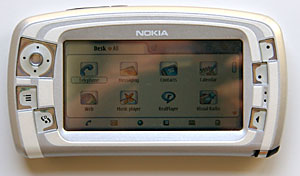
Symbian Series 90 as a UI (user interface) platform has been discontinued. The much talked about Nokia 7700 based on Series 90 appeared only in previews and never saw production. However, one Series 90 device did make it to market, and that product is the Nokia 7710. Billed as both a PDA and a media device, the Nokia 7710 has a wide and bright touch screen, a megapixel camera, a built-in FM radio receiver and 90 MB RAM. Throw in Bluetooth, stereo audio, a full set of PIM (Personal Information Manager) applications and EDGE support, you've got the 7710.
The Nokia 7710 smartphone is also designed for business users. It comes with full set of office applications, email and messaging, local and remote synchronization with PC, and web browsing with Flash support. None of our US carriers sells the Nokia 7710, rather it's only available from importers such as TigerDirect.com and expansys.com. They sell the device unlocked and you can use any GSM carrier's SIM card in the 7710. This is a triband phone supporting the 900/1800/1900 MHz bands (no 850 MHz for Cingular and AT&T Wireless).
In the Box
The package includes the 7710 phone with a black plastic stand, USB sync cable, stereo headphones with FM radio antenna unit, 2 styli, 128 MB MMC card, 1300 mAh Li-Polymer battery, companion CD with PC Suite for synchronization and a printed user manual.
Design and Ergonomics
The Nokia 7710 is a giant among phones. With its 5 inch long and 2.7 inch tall body, the 7710 has a hefty presence. It's certainly still pocket-able although you will notice the weight in your pants' pocket or your purse. Even though big, the design of the Nokia shows a certain elegance. All the corners are slightly curved and the sides slope gently. Both the front and back plastic covers are in silver with some white highlights to create attractive accent lines. The case that houses the phone is black and it's not covered by the silver plates. Six function buttons along with a 5-way directional pad flank the device; three on each side of the display. The d-pad, menu key and desk UI key sit on the left side of the screen while the zoom key, switch key and the Esc key on the right. The earpiece lives under the front face plate between the switch key and the Esc key, and the mic is near the bottom on the left side of the device.
There are no buttons or ports on the left side of the Nokia 7710 and you will only find the Power On/Off switch on the right side panel. You will find the Call Send/Answer, Call End/Reject buttons along with a speaker switch on the top left of the device and a battery door latch on the top right side. The battery door covers the entire back side of the Nokia leaving only the camera lens and the back firing speaker uncovered. Underneath the battery door, you will find the MMC slot and SIM card slot next to the battery. The MMC slot is easy to access, however if you wish to swap SIM card you will need to take the battery out first to access the SIM slot. The charging port and the Pop-port connector for synchronization/headphone/FM radio live on the bottom edge of the phone. Stylus silo opens on the bottom right edge of the 7710.
The Nokia 7710 has an ARM based processor running at 150 MHz, slightly faster than the Nokia Series 60 devices such as the Nokia 7610 and the Nokia N-Gage QD. Applications launch with a slight delay compared to the instant loading on the Series 60 phones, but by no means unbearable. Working with Office files such as Word, Excel and PowerPoint files shows no sign of delay; however saving photos taken with the megapixel camera takes longer than on other Nokia phones. The speed lag also appears in the phone's boot up time and in web page rendering using the bundled web browser application.
The Nokia 7710 comes with about 90 MB of RAM for you to store your PIM data, messages and multimedia files as well as applications. That's a healthy amount of memory if you mainly need to store contacts, calendar, ringing tones and some photos. But if you have a large multimedia library with ton of videos, then you can utilize the MultiMediaCard (MMC) for additional storage space. The 7710 sales package comes with a 128 MB MMC card and the device supports up to 512 MB MMC.
Phone Features
The Nokia 7710 is a GSM cell phone that runs on the 900, 1800 and 1900 MHz bands. For those of you who aren't familiar with the US band support: Cingular and AT&T Wireless rely heavily on the 850 band and also use the 1900 MHz band. T Mobile uses only 1900 MHz in the US. The Nokia 7710 is sold only through importers in this country, not through any carriers, and the device is unlocked which means you can pop in any GSM SIM card and use the phone where service is available.
Like many Nokia phones, the 7710 has strong reception. It gets full signal strength in strong coverage areas and half signal strength in poor coverage areas where other brands struggle to hold a signal. The Nokia has an amazing microphone and earpiece and both incoming and outgoing call quality is very good. You can change the volume of the earpiece and speaker by tapping on the Audio Settings next to the phone dialer screen. The separate Speaker Switch hardware button makes it easy to turn on the speaker during a call.
Like many smartphones, the Nokia 7710 has a dialer screen that you can either launch from the "desk" menu or by pushing the Call Send/Answer button on the device. The dialer screen has two sets of functions depending on whether you are on or off the phone. While not in a call, the dialer screen shows a number pad that looks like the number keypad on regular phones. On the right of the number pad, you will find short cuts to Contacts and Recent Calls. If you have just answered a call and the incoming number isn't in your contacts database, the dialer application will give you an option to save it to your contacts or dial that number. During a call, the shortcuts on the dialer screen will change to Audio Settings and options to make another call or a conference call. When you have two lines in use, the dialer screen will show you both calls' info and you can put one on hold very easily. While providing these easy-to-use features, the dialer screen can also generate some hassle and confusion. To pack all the features into the application, the phone app makes you go through three drop-down menus to access the number pad, the speed dial screen and the call manager which has call send, end, answer, hold options. Doubtless, few of us wish to go through several different screens to handle these basic phone functions.
The Nokia phone supports voice dialing, conference call, call forwarding, call barring and setting various profiles. Voice dialing works well. It can be used in any language and it uses voice recognition so you should record the voice tags if you are the one who will be using the voice dialing feature. The Nokia comes with 6 default profiles including Flight mode, and you can add your own profiles and set ringtones and alerts for incoming calls, email, text and Multimedia messages and more. You have 8 empty slots for speed dial numbers and you can assign them and change them anytime you wish. Like most phones, the number 1 speed dial is reserved for the voice mail. The 7710 also supports unique ringtones for specific contacts and display of photo caller ID. While in a call, you can also access other applications such as taking notes, looking up other contacts, etc. without interrupting the phone call.
The Nokia 7710 has class 10 GPRS for data and EDGE. The phones gets throughput of 55k to 100k on T-Mobile network in our area where EDGE is available. The connection will maintain for a while even after you have stopped using the data network. While the data speed is desirable, web page rendering using the built-in browser is slow, especially when loading pages with a good number of images. Too bad Opera doesn't have a version of their excellent web browser for Series 90.
Display, Sound and Multimedia
Other than the Nokia Communicators such as the 9300 and 9500 series and the upcoming 770, the Nokia 7710 is one of the rare few with a luxurious 3.5 inch TFT wide screen that's made for web browser, working on Office documents and email and watching wide screen video clips. The touch screen sports 640 x 320 resolution and is capable of displaying 65k colors. The display is sharp and bright. Colors are reasonably saturated with a very slight blue tint. Surfing web pages and viewing photos on the Nokia is a joy, though the animations and video samples that come with the phone didn't show off the great screen quality due to the device speed.
The sound quality through the speaker and the headset is superb and the volume is loud. It's a rare thing to hear such excellent sound on a mobile phone. You can use the bundled Music Player to play MP3s. The phone supports AAC, AMR, RealAudio, WAV and MIDI ringtones. If you want to use your own ringtones, simply copy the sound file to the MMC and use the Profile to personalize the ringtones. Another use for the great sound quality is the built-in Pop-port FM radio. To listen to the FM radio, connect the Pop-port headset to the device and launch the Visual Radio application from your phone. The radio gets plenty of FM stations in the San Francisco Bay Area and the Visual Radio software provides you with interface to set up favorite channels, search for stations and more.
The Nokia 7710 supports three video formats: 3GPP standard H.263 profile 0 level 10 video codec with audio encoded in narrowband AMR, MPEG4 SVP level 0 video using the 3GP file format for playback only and RealVideo 8 RealAudio 8 for video streaming. The bundled sample videos on the MMC in these formats played fine on the Nokia. We tried some AVI and MOV files on the phone, none of the clips played. Video playback exhibited some rendering delays and dropped frames using the bundled RealPlayer.
Camera
The Nokia 7710 has good quality megapixel CMOS camera that's capable of taking still photos up to 1152 x 864 resolution with 2x digital zoom and live video with audio at QCIF resolution. Photo quality is similar to the excellent Nokia 7610 and beats many other camera phones on the market, though it can't compare to the Sony Ericsson S710's 1.3MP CCD camera. It does well in bright to moderate light but shows some noise in low light settings. You can set the Contrast and Brightness for the camera and select from three image and video quality levels to take pictures and videos. Nokia bundles a very capable image viewer for photo editing and viewing. You can edit the images, save them into folders, use them for Photo ID in contacts or send them via MMS. You can playback the videos in RealPlayer.
Bluetooth
The Nokia 7710 has integrated Bluetooth 1.1 with support for Serial Port, Dial-Up Networking (DUN), Object Push, File Transfer and Handsfree Profiles. The Bluetooth application is accessible via the Control Panel and provides step-by-step instructions on connecting the device to a PC or pairing it with a Bluetooth headset. To synchronize with the PC or transfer files via Bluetooth connection, you will need to install the PC Suite application on your desktop and then use SyncML for syncing or follow the transfer wizard for transferring data. Pairing the 7710 with several Bluetooth headset including the Motorola HS820 and the Plantronics M3500 proved to be quick and easy. The voice quality via these headsets is decent and the range between the headsets and the device reached over 20 feet.
Battery
The Nokia 7710 has a user replaceable 1300 mAh Li-Polymer battery. That's a healthy amount of juice for this phone. The battery lives under the back plate next to the SIM card slot. If you open the back plate to access the MMC, the phone will notice it and you won't be able to use the phone until you put the back plate back on.
The battery performs well supporting the large and sharp display, Bluetooth, the camera and other functions on the phone. The claimed talk time is up to 12 hours and standby time is up to 14 days. In our test, the phone didn't achieve these goals, but did very well compare to other smartphones with similar feature sets. You can get about 5 days standby time with Bluetooth radio turned off. The talk time is close to 7 hours. The camera and Bluetooth will use more power, of course.
User Interface and Software
The Nokia 7710 runs the Series 90 UI that includes an icon-based home screen that Nokia calls the Desk application, a well designed on-screen text input keyboard and handwriting recognition, a Control Panel that gives you access to over a dozen phone settings and functions as well as a file manager that works with many bundled applications. The Desk UI will look familiar to Series 60 users since it uses similar icons. The on-screen keyboard works very well as does the handwriting recognition. The keyboard will pop up automatically when you are in need of entering letters or numbers; this means you don't need to look for the keyboard or launch it yourself.
The Nokia bundles applications to work with Word documents, Excel spreadsheets and PowerPoint presentations. You can create and edit Word documents and Excel spreadsheets with the applications on the Nokia, but you can only view or run slide shows with PowerPoint presentations. Most of the files we tested didn't need any conversion and ran straight from the MMC. Nokia also bundles a web browser that supports HTML, xHTML, Macromedia Flash 6 and SMS Tags. The Messaging application can send and receive text messages, multimedia messages and email messages. The multimedia messaging supports the 3GPP SML profile which allows you to send short presentations via MMS. Email support includes SMTP, POP3, IMAP4 and APOP protocols. The Nokia also supports WAP Push messages which means that the messages are received without constant connections through the WAP Stack into your Messaging Inbox.
For multimedia, the Nokia 7710 bundles Music Player for playing MP3, WAV and AMR files.; They include Images for viewing photos and editing images using the sketch function; and RealPlayer for playing videos. The Nokia supports Java technology for gaming and you can run games and applications developed for MIDP 2.0 and CLDC 1.1. To work with the FM radio bundled with the 7710 Pop-port headset, Nokia provides the Visual Radio application for you to select channels, search stations, change volume and more. One of the most exciting multimedia features, though in its very early technology stage, is the support for the DVB-H mobile television format which allows you to watch real time broadcast TV. There is no such service yet in the US, some parts of UK have already begun the test runs.
In addition to the Office apps and multimedia tools, the Nokia comes with a full set of PIM (Personal Information Manager) applications. They include Contacts, Calendar, To-do and some useful tools such as Converter (currency, length, mass, energy and much more), Calculator, Clock and Voice Recorder. To sync the device with your desktop PC, you can use the PC Suite on the companion CD.
Conclusion
A stunning looking and unique phone that has Nokia's excellent reception and call quality. The unit is however rather large by phone standards, and the user interface requires too many steps for simple tasks. Call management is handled largely on-screen and many users will miss the standard phone hardware buttons. The 7710 boasts impressive multimedia features: 1 megapixel camera with video, FM radio, RealPlayer and Flash. However the device runs slowly when working with multimedia, despite the 150 MHz processor. Still, if you want a very large resolution touch screen smartphone that combines a PDA with Nokia's signature phone reception and strong Bluetooth, the 7710 is worth considering.
List price:Estimated US price from importers $589 unlocked.
Specs:
Display:3.5 inch TFT wide screen. 640 x 320 resolution, capable of displaying 65k colors.
Battery:1300 mAh Li-Polymer battery. Claimed talk time: up to 12 hours; claimed standby time: up to 342 hours.
Performance:150 MHz ARM family processor. 90 MB RAM for storing data and applications. 128 MB MMC included and supports up to 512 MB MMC capacity.
Size:5 x 2.7 x 0.74 inches (128 x 69.5 x 19 mm). Weighs 6.66 oz. (189 grams).
Camera:1 megapixel CMOS camera capable of taking still photos and video with audio. Max. resolution: 1152 x 864 for still shots and 176 x 144 for videos. F 1:3.2 aperture.
Audio:Built in speaker, mic and Pop-port stereo headset connector. Voice Recorder, Visual Radio and Music Player included.
Networking:Bluetooth 1.1, no IR port.
Phone:GSM 900/1800/1900 MHz. Class 10 GPRS and EDGE.
Software:Symbian OS version 7.0s, Series 90 UI. PIM applications include Contacts, Calendar and To-Do. Document, Sheet and Presentations bundled for working with MS Office files. Multimedia applications include RealPlayer, Music Player, Images and Visual Radio. Web browser and Messaging included. Other tools include: Telephone app for using with the phone features, Calculator, Clock, Converter and File Manager. PC Suite include for synchronizing with desktop PC.
Expansion:One MultiMedia Card (MMC) slot, supports up to 512 MB MultiMedia cards. A 128 MB MMC card included in the package.
When is a mobile phone not just a mobile phone? When it's the Nokia N-Gage QD "Game Deck". Sure, mobile phones can be smart, offering some of the same features found on PDAs. They can all play games, but the ergonomics aren't up to snuff for an hour of action-riddled fun. The N-Gage QD aims to change that, with a design befitting a handheld game console that somehow manages to work well as a phone.
While the original N-Gage (no QD at the end of its name) acquired a collection of descriptive phrases such as the taco and side talkin' thanks to its ungainly design and oddly mounted speaker and mic which required you to hold it on end to talk, the QD is a new animal. Not that the innards have changed much, but the exterior has been completely redesigned. The QD is smaller, looks slick, works well for gaming and phoning and best of all: you hold it normally, flat against your ear and face to have a conversation.
Besides its impressive gaming capabilities, perhaps the most attractive thing about the N-Gage QD is its price. Symbian Series 60 GSM phones are generally pricey, but the N-Gage QD is a wildly affordable Series 60 beast with Bluetooth. What is Symbian Series 60? The Symbian operating system is the most widely used cell phone OS. Series 60 is at the high end of the Symbian OS lineup, offering several PDA-like features, an expansion slot for memory, and the ability to install add-on programs of all sorts (there are more than a thousand available). Such power comes at a price, and Series 60 Nokia phones generally cost between $300 to $500 US. The QD sells in the US for somewhere between free and $149 with activation and an unlocked version for use with any GSM carrier sells for $199 (no contract commitment required).
Not bad! Of course, the N-Gage targets kids who love gaming along with adults. That means the device had to be relatively inexpensive. To keep costs down, Nokia didn't load this with some of the features you'll find on their more expensive Series 60 phones such as the Nokia 7610 or 6620. The QD has only a 4,096 color display rather than the usual high end 65,000 color display (though games look very good), it lacks a camera and there is no cable syncing option and no IR port, so you'll need to suffer through Bluetooth syncing if you need to get your Outlook data onto the phone. If you can live without those features, are on a budget, or best of all are a hardcore gamer who doesn't want to carry two devices or be seen with a Nintendo DS on the commuter train, read on.
Design and Ergonomics
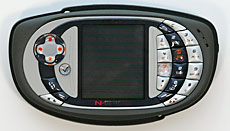
The QD looks like no other cell phone. That's a good thing, since the device doubles as a handheld game deck. Not a flip, not a candy bar, not even a taco; the QD fits well in the hand for use as a phone but has an overall design reminiscent of a game controller. The excellent 5-way directional pad lives on the left and the number pad (also used in gaming) is to the right of the color display. It feels great in the hand when gaming and the controls work perfectly. The d-pad supports diagonals and the domed number keys work well for gaming and dialing. The 5 and 7 keys have a different look and an added bubble-shaped dome on top making them easy to locate since they're used most often in games.
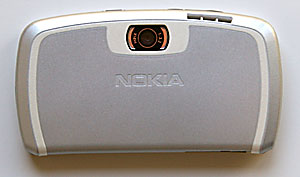
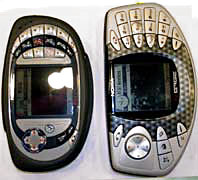
Above: the N-Gage QD and the original N-Gage.
The call send and end buttons flank the lower left and right sides of the front face, and the standard Nokia Series 60 application launch pad and "pencil" (turns on/off predictive text, changes to numeric input/text/symbols) buttons are there along with an action button located just below and to the right of the d-pad. The number pad's standard layout makes dialing and SMS-ing simple, and the keys are backlit. The headset jack and charger port are located on the top edge under a rubber flap, and the MMC card slot is located under a flap on the bottom edge of the phone. That's right: unlike the original N-Gage, the QD has a hot-swappable slot on the side rather than placing the MMC slot under the battery. That means you need not power down the phone to switch cards or games (games are sold on MMC cards). The earpiece speaker is located on the front face in the top right corner and the mic is located on the opposite end, so you can hold the phone normally in conversation. The speaker for system sounds, gaming and speakerphone is located on the bottom edge so it won't accidentally deafen you when holding the phone to your head.
The battery lives under a large door on the back of the phone, and the SIM slot is located under the battery as with most phones. The power button is on the right side under the rubberized surround that wraps the around the sides for a good grip. You do have to press the power button with some force due to the stiffness of the rubber surround. The phone can accept interchangeable face plates and the rubber grip is replaceable. Overall, it looks and feels solid and well made. Our unit has withstood months of gaming use and the buttons haven't lost their firmness or masking, and the casing is still in great shape.
While the QD is larger than today's "micro" phone offerings, it is not overly large and fits into pocket or purse. The QD is as small as possible without compromising gaming ergonomics.
Phone Features, Reception and Data
The N-Gage QD is a GSM device with GPRS for data. It comes in two flavors: an 850/1900MHz version for the US and a 900/1800MHz version for Europe and Asia. If you need a quad band world phone that works anywhere in the world GSM is available, look elsewhere. If you're not an overseas traveler, read on. GSM service in the US is offered by T-Mobile, Cingular and AT&T Wireless, all of whom offer the N-Gage QD at attractive new activation pricing. If you prefer, you can buy the unlocked version of the QD for use with any GSM carrier, no contract required. Just pop in your SIM and start gaming and calling. There is no CDMA version of the N-Gage, which means it is not offered by Sprint and Verizon, the two largest US CDMA network carriers.
The QD has all the features you've come to expect on a quality Nokia phone such as call logging, last number redial, speakerphone, call mute, speed dialing up to 8 numbers, voice dialing up to 25 numbers and support for conference calling. When in a call you can adjust call volume by pressing the d-pad left and right. Volume and mic sensitivity through the built-in mic and earpiece are good. The same can be said of the included dual mono earbud headset (unlike the original N-Gage, the QD doesn't have stereo output) and call quality through a variety of popular Bluetooth headsets. If you're gaming when a call comes in, the QD gracefully notifies you of the call and allows you to answer without any fuss, muss or crashing.
As with most current Nokia phones, reception is very good and near the top of the pack, beating out many other brands and bested only by the Nokia 7610 and palmOne Treo 650. Voice quality has been good, even in low signal areas. Incoming voices were sharp and clear by cell phone standards and our call recipients said we sounded great.
For data, the QD has GPRS class 6. That's not going to excite any data-happy geek, as class 6 is slower than the now more commonly used class 10 (the fastest standard GPRS implementation) and the phone lacks EDGE. Class 6 should give you about 37kbps, while class 10 averages 45 - 53 kbps and EDGE averages 100kbps. The good news is that connections are reliable with the N-Gage and it's very easy to use as a Bluetooth cellular modem with a PDA or notebook (commonly called DUN or dial up networking). Given the display size and rendering abilities of mobile phones, class 6 is more than adequate for browsing the web, though a faster data connection would improve the multi-player gaming experience. Speaking of browsers, Nokia includes their own XHTML web browser which supports WAP and HTML sites. In addition, you get a mail application that supports IMAP4, POP3 and SMTP.
Gaming
When it comes to gaming, the N-Gage QD is truly a rare breed. The combination of a great game deck design, top tier AAA tiles and multiplayer capabilities over GPRS makes this device unique and appealing to gamers who are serious about gaming on their cell phones. You won't find this combination of features on any PDA, not even the Tapwave Zodiac which lacks GPRS and a wide selection of top titles. Even handheld gaming consoles such as the Nintendo DS and the upcoming Sony PSP (due out late March in the US) and Gizmondo (US release in Q1) can't compete on all fronts. To further differentiate the QD from the pack, Nokia hosts the N-Gage Arena where players can download game demos, play massive multiplayer games, participate in competitions and more.
Sims screen shot
No gaming device can survive without a solid game library and Nokia has built and continues to build an impressive line of games that will attract not only casual gamers but serious gamers too. Aside from the usual mobile gaming titles such as Snakes and Bomberman, you'll find very attractive ports and original games that can't be found on other handheld gaming devices. Sports games fans will find Madden, Tiger Woods, FIFA and SSX titles. First and third person shooters can get their fix on Pathway to Glory, Call of Duty and even Splinter Cell Chaos Theory. And let's not forget RPG fans who will drool over The Elder Scrolls Travels: Shadowkey, X-Men Legends and the first mobile MMORPG (massive multiplayer online role playing game) Pocket Kingdom. All games on the N-Gage are designed for you to play for ten minutes or the entire day depending on your schedule, true to the mobile purpose; and most support multiplayer over Bluetooth.
The games' mobile implementations work well and are well-mated to the N-Gage's controls. The game designs and ports have more streamlined sequences or story lines, suitable for the handheld portable gaming experience. In Ashen, a first person shooter game, you will explore 8 long levels with various types of terrain and hunt down monsters. The sequence is straightforward: explore the level, kill all monsters and get out. The movement and controls are easy even without the traditional shoulder buttons. Picking up weapons and shooting at enemies are equally effortless. The game has amazing audio that could startle you when a monster catches you by surprise hiding in an alcove or coming around the corner. It doesn't have as many types of weapons as you will find in Unreal Tournament, but with 4 multiplayer maps and a good number of weapons you'll feel the same adrenalin rush in death match and team death match modes.
The streamlined game design also works in more complex games such as The Sims Bustin' Out. The N-Gage version of the Sims changes the focus of the game from free play to goal/quest oriented play. You will unlock items by completing goals given to you by Sims and move into bigger and bigger houses along the way. The game adds more depth to the main quest by packing in a good number of mini games where you can become the most successful Sim. The number pad on the QD gives the Sims game plenty of control options and it doesn't have much of a learning curve before you get helplessly addicted. The multiplayer game allows you to trade or sell rare items through daily live auctions. There are many, many more titles, so check out a few more for yourself if you get a QD! Games are sold in many retail stores on MMC cards and average $29 to $35, and both the original N-Gage and the N-Gage QD can play the same games.
The 2.2" 176 x 208 pixel 4,096 color backlit display may not be the best on the block but it manages to look darned good when playing games. It has good color saturation, brightness and contrast. It's not the ideal unit for photo viewing given the lack of color depth, but then the QD lacks a camera anyway.
Sound through the speaker is of good quality and can get plenty loud-- certainly great for gaming. Unfortunately it is a mono device (the original N-Gage was stereo) and it has no FM radio capability. While the QD can play MP3s, you won't be using it as an iPod replacement since it lacks stereo output. Hence the unit ships with a dual mono earbud headset and there is no stereo headset option. The QD supports MIDI and WAV ringtones but not MP3 ringtones.
Battery Life
The QD ships with the 1070 mA Nokia BL-6C Lithium Ion rechargeable battery and Nokia's standard compact world charger. That's a high capacity battery and the N-Gage has excellent battery life. When not gaming and talking on the phone for 45 minutes/day with Bluetooth turned on, the device lasts 5 days on a charge. Gaming reduces battery life and you'll get approximately 4 hours of pure gaming on a charge.
Bluetooth
The QD has integrated Bluetooth 1.1 class B. You can use Bluetooth for multiplayer gaming, sending and receiving files (OBEX profile), syncing (serial port profile) and headsets (hands free profile). Like most Nokia phones, the N-Gage's Bluetooth was solid and easy to use. We used it as a wireless modem over Bluetooth with a variety of PDAs and a notebook, exchanged files and contact records with desktops and PDAs and used it with several of the Bluetooth headsets reviewed on our site. The QD worked well with all the headsets we tested, offering easy pairing, reliable connections, good audio quality, volume and range. Syncing to Outlook using PC Suite over Bluetooth is a challenge so be prepared to spend some time getting that connection working. Also be sure to get the latest version of PC Suite available for the N-Gage, as each new version offers improvements in ease of use and reliability.
Software Bundle
The device runs Symbian Series 60, 6.0 version 1. Like all Series 60 phones, it comes with a generous helping of useful applications for PIM data, and apps such as a video player, image viewer, calculator, clock, voice recorder, ringtone composer, unit converter, screen shot, web browser and email client.
For PIM apps, the QD has Calendar, Contacts, Tasks and a Notes app too. The Contacts application has fields for first name, last name, company, address, telephone (home and work), web site, email address, mobile phone number (home and work), fax (home and work), pager, job title, notes, birthday and more . The Calendar has day, week and month views, and you can specify the default view and the starting day of the week. Of course it has alarms and you can create new entries categorized as Meeting, Memo or Anniversary. Calendar supports repeating events: weekly, bi-weekly, monthly and yearly. To-do is a task management app that supports priorities and Notes is a note taking application. All of these sync to Outlook on the desktop using PC Suite on the desktop. Mac owners can give iSync a try.
Conclusion
If you're a gamer, this is an excellent device. There's a good selection of high quality titles and the device has great gaming ergonomics. It works well as a phone and is the most affordable current Symbian Series 60 smartphone.
Pro: Great for gaming and there's an excellent selection of titles. It's sturdy and will withstand plenty of gaming action. The device is attractive and portable. Strong compliment of mobile phone features and works well as a phone overall. A very affordable Series 60 device that works with the wealth of Series 60 freeware and shareware on the market. Bluetooth is reliable. Though only 4,096 colors, the display looks great when gaming. MMC slot is hot swappable and easily accessible (no need to pull the battery out). Very good battery life when used as a phone and organizer, respectable life when gaming.
Con: No cabled sync port for those who don't want to tackle Bluetooth syncing to the desktop for PIM data. Mono rather than stereo output. GPRS class 6 is not very fast by today's standards and likely hinders more bandwidth intensive multi-player game features. Speed dial only holds 8 numbers.
Price: $199 for the unlocked version for use with any carrier. Carrier subsidized versions available from T-Mobile, AT&T Wireless and Cingular for $149 and often much less (free!) with new activation.
Specs:
Display:TFT color backlit LCD. 12 bit color, 4,096 colors. 176 x 208 pixel display, 2.2" diagonal.
Battery:Lithium Ion rechargeable. Battery is user replaceable. 1070 mA Nokia BL-6C.
Performance:Symbian Series 60 OS, 6.0 version 1. 104MHz ARM 9 processor, 3.4 megs internal memory. Expandable via MMC cards.
Size:4.65 x 2.68 x .87 inches. Weight: 5 oz.
Audio:Built in speaker, mic and 2.5mm headset jack.Audio is mono, and the phone will output dual mono with Nokia's headset. Supports Midi and WAV ringtones. Supports voice dialing and has speakerphone.
Networking:Bluetooth 1.1.
Wireless:GSM 850/1900MZ (US model), 900/1800 (Asia, Europe). GPRS class 6 (2+2, 3+1, class B).
Software:Symbian Series 60 OS, 6.0 version 1. Messaging (mail client for POP, IMAP and SMTP, MMS, SMS and threaded IM), web browser (WAP and xHTML), Contacts, Calendar, Notes, To-do, ringtone composer (midi), video player, calculator, clock, voice recorder, screen shot, image viewer, Converter (unit conversion), Profiles, Game Manager, call log, app manager, N-Gage Arena (multiplayer online gaming over GPRS).
Expansion:1 MMC slot accepts MMC cards only (not SD). Card is hot swappable.







 Posts
Posts


